Bluehost vs Kinsta (2026): Which Hosting Is Better for Beginners?

Choosing the right web hosting provider is one of the biggest decisions you’ll make when starting a blog.
Bluehost and Kinsta are both excellent WordPress hosting providers, but they serve different users. Bluehost makes it easy and affordable for beginners to launch their first website, while Kinsta specialises in premium managed WordPress hosting with high performance and advanced features.
So, which hosting provider is the better choice for beginners?
In this comparison, I’ll compare pricing, ease of use, WordPress setup, performance, security, customer support, and overall value. By the end of this guide, you’ll know which hosting service is the best fit for your blogging journey.
🚀 Ready to start your first blog?
If you’re completely new to blogging, my beginner-friendly guide will walk you through every step—from choosing a domain name to publishing your first blog post.
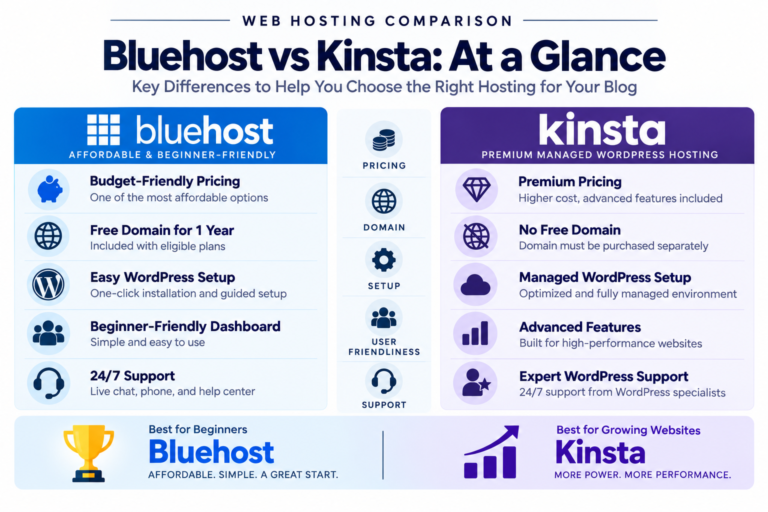
Quick Comparison
| Feature | Bluehost | Kinsta |
|---|---|---|
| Best For | Beginners | High-performance WordPress sites |
| Starting Price | Budget-friendly introductory pricing | Premium managed WordPress pricing |
| Free Domain | ✅ Yes (eligible plans) | ❌ No |
| Free SSL | ✅ Yes | ✅ Yes |
| WordPress Installation | ✅ One-click | ✅ Fully managed |
| Ease of Use | ⭐⭐⭐⭐⭐ | ⭐⭐⭐⭐☆ |
| Customer Support | 24/7 Chat & Phone | 24/7 Expert Chat |
| Overall Beginner Rating | ⭐⭐⭐⭐⭐ | ⭐⭐⭐⭐☆ |
🏆 Overall Winner for Beginners: Bluehost
What Is Bluehost?
Bluehost is one of the world’s best-known web hosting providers and has been officially recommended by WordPress.org for many years.
It’s designed to help beginners launch a WordPress website quickly without needing technical experience.
Bluehost includes:
- Beginner-friendly dashboard
- One-click WordPress installation
- Free domain for the first year (eligible plans)
- Free SSL certificate
- AI-powered website creation tools
- 24/7 customer support
If you’re starting your first blog, Bluehost offers a simple and affordable way to get online.
💻 New to WordPress?
You don’t need coding experience to build a successful website.
What Is Kinsta?
Kinsta is a premium managed WordPress hosting provider built exclusively for WordPress websites.
Instead of focusing on low-cost shared hosting, Kinsta emphasises speed, security, automatic maintenance, and developer-friendly tools. It includes Google Cloud infrastructure, a global CDN, edge caching, staging environments, and expert WordPress support.
Kinsta includes:
- Managed WordPress hosting
- High-performance cloud infrastructure
- Free CDN
- Edge caching
- Daily backups
- Free website migrations
- Staging environments
- Expert WordPress support
While Kinsta is an excellent choice for growing businesses and high-traffic websites, its premium pricing makes it less practical for someone launching their first blog.
What We’ll Compare
To help you choose the right hosting provider, we’ll compare Bluehost and Kinsta in the following categories:
- Pricing
- Ease of Use
- WordPress Setup
- Performance
- Security
- Customer Support
- Pros & Cons
- Overall Value for Beginners
By comparing each category individually, you’ll clearly understand which hosting provider best matches your experience level, budget, and long-term blogging goals.
📚 Still comparing hosting providers?
These beginner-friendly comparisons may also help you choose the right hosting.
Pricing
Pricing is one of the biggest factors when choosing your first hosting provider.
Bluehost and Kinsta have very different pricing models. Bluehost is designed to be affordable for beginners, while Kinsta focuses on premium managed WordPress hosting with advanced features included.
Bluehost
Bluehost offers budget-friendly introductory pricing, making it one of the most affordable ways to start a WordPress blog.
Key benefits include:
- Affordable introductory plans
- Free domain for the first year (eligible plans)
- Free SSL certificate
- One-click WordPress installation
- Beginner-friendly dashboard
- Easy upgrade options as your website grows
For most new bloggers, Bluehost provides excellent value without requiring a large upfront investment.
💰 Wondering how much it really costs to start a blog?
Before choosing a hosting plan, see exactly what you should budget for your first website.
Kinsta
Kinsta is positioned as a premium managed WordPress hosting provider.
Its plans include:
- Managed WordPress hosting
- Google Cloud infrastructure
- Free CDN
- Daily backups
- Staging environments
- Premium performance optimization
- Expert WordPress support
Although Kinsta costs significantly more than traditional shared hosting, it includes many advanced features.
Winner
🏆 Bluehost
For beginners, Bluehost offers significantly better value thanks to its lower starting cost and beginner-friendly features.
Ease of Use
If you’re building your first website, an easy setup process can save hours of frustration.
Bluehost
Bluehost was built specifically for beginners.
It includes:
- Simple dashboard
- Guided setup process
- AI-powered website creation tools
- Easy domain management
- Beginner-friendly navigation
Even if you’ve never built a website before, Bluehost makes the process straightforward.
💻 Never built a website before?
Learn how to create a WordPress blog without writing a single line of code.
Kinsta
Kinsta provides a clean, modern dashboard called MyKinsta.
It’s intuitive and powerful, but it’s designed for users who already understand basic WordPress concepts. Beginners may find some of its advanced tools unnecessary when launching a first blog.
Winner
🏆 Bluehost
Bluehost provides a more beginner-friendly experience with guided setup and simpler navigation.
WordPress Setup
Both Bluehost and Kinsta are optimised for WordPress, but they offer different experiences.
Bluehost
Bluehost includes:
- One-click WordPress installation
- AI website setup tools
- Guided onboarding
- WordPress-optimized hosting
- Beginner-friendly dashboard
Most users can publish their first website within minutes.
🚀 Ready to launch your first blog?
Follow my complete beginner guide and build your first WordPress website step by step.
Kinsta
Kinsta is built exclusively for WordPress.
It offers:
- Fully managed WordPress hosting
- Automatic updates
- Staging environments
- Performance optimization
- Developer tools
- Automatic daily backups
The setup is excellent, but many of these advanced features become more valuable as your website grows.
Winner
🏆 Bluehost
For first-time bloggers, Bluehost offers a simpler and more approachable WordPress setup experience.
Performance
Website speed affects user experience, SEO, and visitor satisfaction.
This is where Kinsta has a clear advantage.
Bluehost
Bluehost provides:
- Reliable SSD storage
- WordPress optimization
- Built-in caching
- Consistent uptime
- Excellent performance for beginner websites
Bluehost delivers more than enough speed for personal blogs, affiliate websites, and small business sites.
Kinsta
Kinsta is designed for premium performance.
It includes:
- Google Cloud Platform infrastructure
- Edge caching
- Global CDN
- High-performance server architecture
- Excellent scalability
- Fast page loading for high-traffic websites
These features make Kinsta one of the fastest managed WordPress hosting providers available.
Here’s a simple way to decide which hosting provider is right for you.
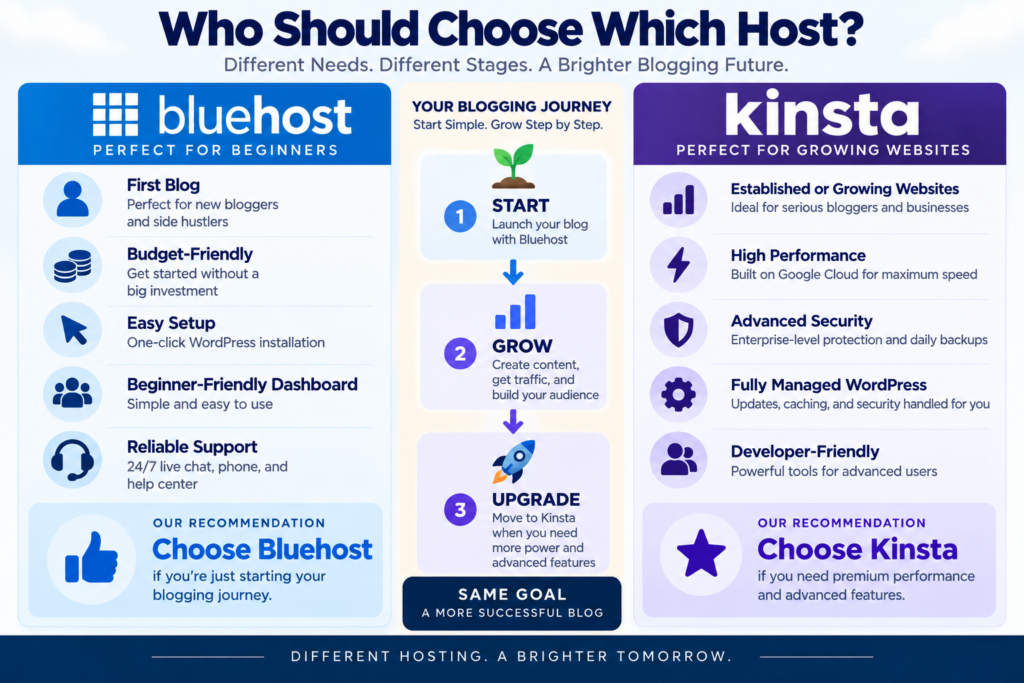
Figure 2. Bluehost is ideal for beginners, while Kinsta is designed for growing websites that need premium performance.
📚 Still comparing hosting providers?
These premium hosting comparisons may also help.
Winner
🏆 Kinsta
If maximum speed and premium performance are your top priorities, Kinsta is the stronger choice.
However, for beginners launching their first blog, Bluehost still provides excellent performance at a much lower cost.
Security
Keeping your website secure is essential, especially when you’re building your first blog.
Both Bluehost and Kinsta include strong security features, but they take different approaches. Bluehost provides everything most beginners need, while Kinsta focuses on enterprise-level security and proactive protection.
Bluehost
Bluehost includes several security features designed for new website owners:
- Free SSL certificate
- Automatic WordPress updates
- Secure account management
- Spam protection options
- Additional security tools available as your website grows
For most personal blogs and small business websites, Bluehost provides excellent day-to-day protection without requiring technical knowledge.
🔒 Want to build your blog securely from day one?
Follow my beginner-friendly guide to launch your WordPress website the right way.
Kinsta
Kinsta includes advanced security features, such as:
- Enterprise-level firewall
- Continuous malware monitoring
- Automatic daily backups
- Free hack fixes
- DDoS protection
- Isolated container technology
These features are particularly valuable for high-traffic websites and online businesses where uptime and security are critical.
Winner
🏆 Kinsta
Kinsta offers a more advanced security environment. However, Bluehost still provides more than enough protection for most beginners.
Customer Support
Good customer support can save you hours of frustration when you’re learning how to build your first website.
Bluehost
Bluehost provides:
- 24/7 live chat
- 24/7 phone support
- Comprehensive knowledge base
- Beginner-friendly tutorials
When I started blogging, I contacted Bluehost’s support team several times while learning WordPress. They helped me solve problems quickly, allowing me to focus on writing instead of troubleshooting technical issues.
💡 Still comparing premium hosting providers?
These guides may also help you choose the right hosting service.
Kinsta
Kinsta also offers excellent customer support.
It includes:
- 24/7 live chat
- WordPress specialists
- Fast response times
- Extensive documentation
- Technical expertise focused entirely on WordPress
Its support team is particularly valuable for developers, agencies, and businesses running mission-critical websites.
Winner
🏆 Tie
Both companies provide excellent customer support.
Bluehost offers exceptional assistance for beginners, while Kinsta excels at solving advanced WordPress issues.
Bluehost Pros & Cons
Pros
- Beginner-friendly dashboard
- Free domain for the first year (eligible plans)
- One-click WordPress installation
- Officially recommended by WordPress.org
- Affordable introductory pricing
- Excellent support for beginners
Cons
- Renewal pricing is higher than introductory pricing
- Some advanced features require higher-tier plans
Kinsta Pros & Cons
Pros
- Outstanding website performance
- Premium managed WordPress hosting
- Enterprise-level security
- Google Cloud infrastructure
- Daily automatic backups
- Expert WordPress support
Cons
- Premium pricing
- No free domain included
- WordPress hosting only
- More features than most beginners need
Who Should Choose Bluehost?
Bluehost is the better choice if you:
- Are starting your first blog
- Want an affordable hosting provider
- Prefer an easy WordPress setup
- Need a free domain with eligible plans
- Want beginner-friendly support
Who Should Choose Kinsta?
Kinsta may be the better choice if you:
- Already run a successful website
- Need premium WordPress performance
- Manage a high-traffic blog or online business
- Want advanced security and managed hosting
- Prefer a fully managed WordPress environment
My Personal Recommendation
If I were helping someone launch their very first blog today, I would recommend Bluehost.
When I started blogging, I wanted a hosting provider that made everything simple. Bluehost allowed me to install WordPress quickly, manage my website with confidence, and focus on creating content instead of learning complicated technical settings.
Kinsta is one of the best premium managed WordPress hosting providers available today. Its speed, security, and infrastructure are impressive. However, for most beginners, those premium features come with a price that simply isn’t necessary when you’re just getting started.
My advice is simple:
Start with Bluehost, learn how blogging works, and build your audience. If your website grows to the point where you need enterprise-level performance, Kinsta is an excellent upgrade to consider in the future.
🚀 Ready to start your blogging journey?
Bluehost gives beginners everything they need to launch a WordPress website with confidence.
Frequently Asked Questions
Is Bluehost better than Kinsta for beginners?
Yes. Bluehost is generally the better choice for beginners because it’s more affordable, includes a free domain with eligible plans, and offers a simpler onboarding experience.
Why is Kinsta more expensive?
Kinsta provides premium managed WordPress hosting with advanced performance, security, automatic backups, and expert WordPress support. These features are designed for growing businesses and high-traffic websites.
Can I migrate from Bluehost to Kinsta later?
Yes. Many website owners start with Bluehost and move to a premium managed hosting provider like Kinsta as their traffic and technical requirements increase.
Which hosting provider is faster?
Kinsta generally delivers better performance thanks to its premium cloud infrastructure and managed WordPress platform. Bluehost still offers excellent performance for beginner blogs and small business websites.
Conclusion
Bluehost and Kinsta are both excellent hosting providers, but they serve different audiences.
If you’re launching your very first blog, Bluehost is the better choice. It combines affordable pricing, beginner-friendly tools, and reliable performance, making it easy to start your blogging journey with confidence.
Kinsta is an outstanding premium managed WordPress hosting provider. If your website grows significantly and you need enterprise-level speed, security, and scalability, it’s an excellent long-term option.
For most beginners, however, Bluehost provides everything you need to build a successful blog without paying for features you won’t use yet.
Recommended Next Reads
📘 Bluehost Review: Is It the Best Hosting for Beginners?
📘 How to Start a Blog (Step-by-Step Guide)
📘 How Much Does It Cost to Start a Blog?