How Much Does It Cost to Start a Blog? (2026 Beginner Guide)
Worried that starting a blog might be too expensive?
You are not alone.
Many beginners think they need hundreds or even thousands of dollars to create a professional blog.
But here is the good news:
You can start a blog on a small budget.
You do not need expensive equipment, coding skills, or premium blogging tools to get started.
However, the real cost depends on the type of blog you want to create, the hosting plan you choose, and whether you pay for optional tools.
In this beginner-friendly guide, you will learn:
- How much it costs to start a blog in 2026
- Which blogging expenses are essential
- How much WordPress hosting and domain names cost
- What you might pay in your first year
- Which hidden costs to watch out for
- How to start a blog without wasting money
I will also share what I learned from using Bluehost as my first web hosting provider for around three years.
My goal is simple: help you understand your blogging budget before you spend any money.
Affiliate Disclosure: This article contains affiliate links. If you purchase through these links, I may earn a commission at no extra cost to you. I only recommend services I believe may be useful to beginners.
How Much Does It Cost to Start a Blog? (Quick Answer)
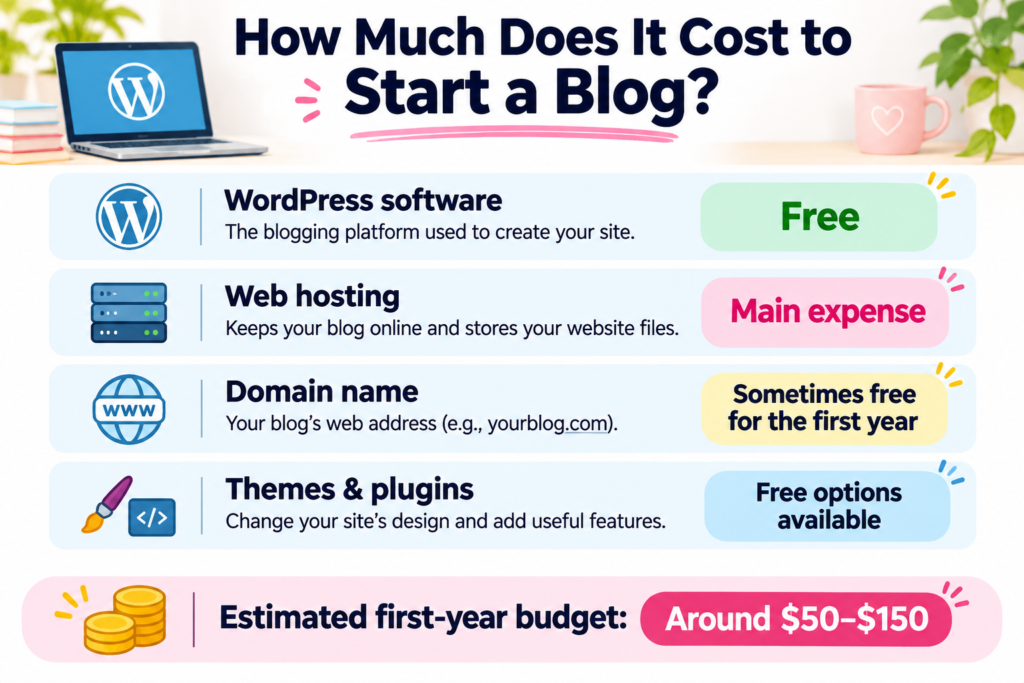
A basic self-hosted WordPress blog may cost around $50–$150 for 12 months of service under some introductory offers. However, your actual upfront payment may be higher if your hosting provider requires a longer prepaid contract. Always check the total checkout price and renewal terms before purchasing.
This is an illustrative budget, not a guaranteed quote. Some hosting companies require you to pay for 12 months or more upfront to receive their lowest advertised monthly rate.
Here is a simple breakdown:
| Blogging Expense | Estimated Cost |
| WordPress.org software | Free |
| Web hosting | Around $3–$12/month at introductory rates |
| Domain name | Free for the first year with some plans, or around $10–$25/year |
| WordPress theme | Free to start |
| Essential plugins | Free to start |
| Logo and basic graphics | Free with beginner tools |
| Estimated first-year budget | Around $50–$150 for a basic setup |
These are general planning estimates in USD, not live checkout prices. Your actual total may be higher, especially if you choose a monthly plan, buy a domain separately, or add paid services.
Important: Your second-year costs may be higher because promotional hosting prices and free first-year domain offers can expire.
You also do not need to buy everything on this list separately. Some hosting packages include a domain for the first year, SSL, and WordPress installation tools.
Can You Start a Blog for Free?
Yes, you can start a blog for free using certain hosted blogging platforms.
However, free platforms may have limitations, including:
- Limited control over your website
- Fewer customisation options
- Restrictions on monetisation
- A platform-branded website address
- Additional charges for advanced features
If you want to build a blog you can customise and potentially monetise with affiliate marketing, a self-hosted WordPress website is worth considering.
You will need a hosting provider, but you can start with free themes and plugins to keep your budget low.
Explore Beginner-Friendly Hosting
Want to see how much it could cost to launch your own WordPress blog?
Bluehost offers WordPress hosting plans designed for beginners. Compare the introductory price, upfront payment, and renewal terms before choosing a plan.
Small note: Prices and promotional offers can change. Check the full amount at checkout before purchasing.
What Do You Actually Need to Start a Blog?
Starting a blog is simpler than many beginners expect.
For a basic self-hosted WordPress blog, you only need three main things:
- A domain name
- Web hosting
- WordPress software
You can add more tools later as your blog grows.
1. Domain Name: Your Blog’s Address
A domain name is the address people type into their browser to visit your website.
For example:
yourblogname.com
Your domain name helps readers find and remember your blog.
A typical .com domain might cost around $10–$25 per year, although prices vary by registrar, domain extension, and availability.
Some hosting providers, including Bluehost on eligible plans, offer a free domain registration for the first year.
But remember:
A free first-year domain does not mean a free domain forever.
You will usually need to pay a renewal fee to keep it after the promotional period.
Before registering your domain, check:
- The first-year registration price
- The renewal price
- Whether domain privacy is included
- Whether the domain is eligible for a promotional offer
Beginner Tip: Choose a short, easy-to-spell domain name that fits your blog’s topic or brand.
2. Web Hosting: Where Your Blog Lives
Web hosting stores your website’s files and makes your blog available online.
Think of your domain name as your website’s address and web hosting as the space where your website lives.
For a beginner blog, shared hosting or an entry-level WordPress hosting plan is often enough.
Some providers advertise introductory prices of around $3–$12 per month, depending on the plan and contract length.
However, there is one important detail:
The advertised monthly price may be calculated from a longer contract paid upfront.
For example, a hypothetical hosting plan advertised at $4 per month with a 12-month prepaid term would cost:
$4 × 12 months = $48 upfront, before taxes and optional services.
The same provider may charge more when your plan renews.
This is why you should compare the total cost rather than looking only at the monthly headline price.
My Experience With Bluehost
Bluehost was the first hosting provider I used when I started blogging.
I used it for around three years, and one thing I appreciated was how easy it was to get started with WordPress.
As a beginner, I did not want to spend hours learning complicated technical settings.
Bluehost made the initial setup feel manageable.
I also had a malware problem while using Bluehost. Its support team helped me resolve the issue, although the cleanup involved a paid service.
That experience taught me an important lesson:
Affordable hosting is useful, but you should also consider security, backups, and potential extra costs.
Bluehost is one option I recommend beginners compare, but it is still important to review the current features, total price, and renewal terms before signing up.
Compare Hosting Plans Before You Buy
Not sure which hosting plan fits your budget?
Start by comparing beginner WordPress hosting options and checking what each package includes.
Small note: Check the full contract price, renewal rate, and optional add-ons before deciding.
3. WordPress Software: Free to Use
One of the best things about WordPress is that the WordPress.org software itself is free.
You do not need to pay a software license fee to install it on your hosting account.
WordPress lets you:
- Create blog posts and pages
- Customise your website’s design
- Organise articles into categories
- Add useful features with plugins
- Build a website without writing code
You can also choose a free WordPress theme and free plugins when you are starting.
Important: WordPress.org and WordPress.com are different.
WordPress.org is the free software you can install on your own hosting account. WordPress.com is a hosted service with its own plans and features.
If you want more control over your blog, self-hosted WordPress.org is a popular choice.
The good news is that you can start with a simple setup and upgrade only when your blog actually needs more features.
Bluehost Pricing Explained for Beginners (2026)
If you want to start a WordPress blog, web hosting will probably be your main expense.
Bluehost is one hosting provider worth considering, especially if you are new to WordPress.
But before choosing a plan, it is important to understand three things:
- The introductory price
- How much you pay upfront
- The renewal price after your first contract
A low advertised monthly price does not always mean a low monthly payment.
Bluehost Hosting Plans: Starter vs Business Essentials
Here is an example of Bluehost’s advertised WordPress hosting prices in USD for a 36-month introductory term.
| Feature | Starter | Business Essentials |
| Introductory monthly equivalent | $3.79 | $6.79 |
| Introductory contract | 36 months | 36 months |
| Calculated upfront hosting cost | $136.44 | $244.44 |
| Free domain for first year | Eligible domains | Eligible domains |
| Free SSL certificate | Included | Included |
| WordPress installation tools | Included | Included |
| Best suited for | A beginner blog | Blogs needing more resources |
Pricing example checked in November 2026. Prices, included features, taxes, and promotions may change. These totals exclude optional add-ons.
The prices above are monthly equivalents, not necessarily monthly payment options.
For example:
Starter: $3.79 × 36 months = $136.44 upfront.
Business Essentials: $6.79 × 36 months = $244.44 upfront.
This difference matters if you are trying to start a blog on a small budget.
A lower monthly equivalent can still mean a larger upfront payment when you choose a long contract.
Which Bluehost Plan Should Beginners Choose?
For many new bloggers, the Starter plan is a reasonable place to begin comparing options.
You may not need advanced hosting features when your website has only a few pages and blog posts.
The Business Essentials plan may be worth considering if you need more storage, additional website capacity, or enhanced features.
Before upgrading, ask yourself:
- Am I starting only one blog?
- Do I need the extra features now?
- Can I afford the full upfront payment?
- What will this plan cost when it renews?
My recommendation: Start by comparing the lowest suitable plan. Don’t pay for extra features just because you might need them someday.
Find a Hosting Plan That Fits Your Budget
Want to compare Bluehost’s current WordPress hosting plans?
Review the Starter and Business Essentials plans to see which features you actually need.
Small note: Check the billing period, upfront total, renewal terms, and optional extras before purchasing.
First-Year Blogging Costs vs Renewal Costs
One of the biggest budgeting mistakes beginners make is focusing only on the introductory hosting price.
Many hosting providers offer discounted rates for new customers.
When the promotional period ends, the regular renewal rate may be higher.
This means your blog could cost more to maintain later, even if you do not add any new tools.
Example: How Hosting Renewal Costs Work
Imagine you choose a hosting plan with these hypothetical prices:
- Introductory price: $4 per month
- Initial contract: 12 months
- Renewal price: $12 per month
- Renewal contract: 12 months
Your hosting costs would be:
| Expense | Cost |
| First 12 months | $48 |
| Next 12 months | $144 |
| Total for 24 months | $192 |
This is a simplified example, not a quote for a specific Bluehost plan.
The lesson is simple:
Always compare the introductory price with the renewal price.
A hosting provider may offer different renewal rates depending on whether you renew monthly, annually, or for several years.
What About Bluehost Renewal Pricing?
Bluehost publishes renewal pricing for its hosting plans, but the amount can depend on the product and renewal term.
For example, a 36-month renewal may have a lower monthly equivalent than a 12-month renewal.
However, it may also require a larger payment upfront.
Before purchasing, check the current renewal details on Bluehost’s official website.
If you already have a Bluehost account, review the renewal information in your account dashboard.
Domain Renewal Costs
Your domain name is another recurring expense.
Some Bluehost hosting plans include a free domain registration for the first year.
After that, you will normally need to pay to renew your domain.
The exact price depends on your domain extension and registration terms.
For example, a .com domain may have a different renewal price from a .net or .blog domain.
Check the domain renewal price before you register.
Also remember that domain registration and web hosting are separate services, even when you buy them together.
Don’t Forget Optional Add-Ons
During checkout, you may see optional products such as:
- Domain privacy
- Premium email services
- Additional security products
- Premium backup services
- SEO tools
- Website design services
Some may be useful, but you do not necessarily need all of them when starting your first blog.
Check which features are already included in your hosting plan.
Beginner Tip: Review your checkout summary carefully. Remove optional services you do not need before completing your purchase.
Free vs Paid WordPress Tools: What Do You Really Need?
Another common question is whether you need to buy premium WordPress themes and plugins.
The good news is that you can create a useful, professional-looking blog with many free tools.
You can upgrade later if your blog needs more advanced features.
Free WordPress Themes
A WordPress theme controls how your website looks.
It affects your blog’s layout, fonts, colours, and overall design.
There are many free themes available.
For example:
- Kadence
- Astra
- GeneratePress
- Twenty Twenty-Five
These themes offer different customisation options and can be used without buying a premium license.
You do not need an expensive design to publish helpful blog posts.
My recommendation: Choose a simple, mobile-friendly theme and focus on creating useful content first.
Free WordPress Plugins
Plugins add features to your WordPress website.
For example, you might use plugins for:
- Search engine optimization
- Contact forms
- Website backups
- Spam protection
- Website performance
- Security
Many popular plugins have free versions.
Here are some examples:
| Blogging Task | Free Tool Example |
| SEO | Yoast SEO |
| Contact forms | WPForms Lite |
| Backups | UpdraftPlus |
| Analytics | Google Site Kit |
| Spam protection | Antispam Bee |
Free versions may have limits, and plugin compatibility can change.
You also do not need to install every plugin immediately.
Too many unnecessary plugins can make your website harder to manage.
Start with the tools your blog actually needs.
Do You Need Premium WordPress Plugins?
Not necessarily.
Premium plugins can be useful when you need features such as advanced design options, automation, detailed reports, or specialised website functions.
But these are not essential expenses for most beginners.
Before buying a premium plugin, ask:
- Is there a free version?
- Do I need the paid feature right now?
- Is it a one-time purchase or a recurring subscription?
- Will it help me achieve a specific goal?
If you cannot clearly explain why you need a paid tool, you can probably wait.
How Much Should You Budget for Blogging Tools?
Here is a simple planning example:
| Tool | Beginner Budget |
| WordPress software | $0 |
| Free WordPress theme | $0 |
| Free SEO plugin | $0 |
| Free backup plugin | $0 |
| Free basic design tools | $0 |
| Optional premium tools | $0 until needed |
| Total for basic tools | $0 |
This does not include web hosting, domain registration, or any paid services you choose later.
You can build your first blog with free WordPress tools and pay only for the hosting and domain services you need.
Start With the Essentials
Ready to create your first WordPress blog without buying unnecessary extras?
You can begin with a suitable hosting plan, WordPress, a free theme, and a few useful plugins.
Small note: Compare current prices and included features before choosing a plan. Premium tools are optional for most new blogs.
How to Start a Blog on a Budget (7 Money-Saving Tips)
You do not need a large budget to start a successful blog.
In fact, spending more money doesn’t guarantee your blog will grow faster.
The smartest approach is to start with the essentials, learn how blogging works, and upgrade only when you need to.
Here are seven practical ways to keep your blogging costs low.
1. Start With an Affordable Hosting Plan
Web hosting is usually one of the first expenses you will need to consider.
If you are creating your first WordPress blog, an entry-level hosting plan may be enough.
You probably do not need expensive hosting designed for large businesses or high-traffic websites.
When comparing hosting plans, look at:
- The introductory price
- The total upfront payment
- The renewal price
- The features included
- Customer support options
- Backup and security features
Remember that the cheapest advertised monthly rate may require a long contract.
Beginner Tip: Choose a hosting plan that fits both your current budget and your expected renewal costs.
2. Use a Free WordPress Theme
You do not need to buy a premium theme to make your blog look professional.
Many free WordPress themes offer clean designs, mobile-friendly layouts, and useful customisation options.
For example, Kadence, Astra, and GeneratePress offer free versions.
Choose a theme that is easy to use and works well on mobile devices.
You can always consider a premium version later.
3. Start With Free Plugins
WordPress plugins can add useful features to your website.
But buying too many premium plugins can quickly increase your blogging expenses.
Start with free versions whenever possible.
For example, you may find free tools for:
- Basic SEO
- Website backups
- Contact forms
- Analytics
- Spam protection
Only upgrade when you need a specific paid feature.
4. Create Your Own Blog Graphics
You do not need to hire a graphic designer when starting your first blog.
Free design tools can help you create:
- Blog featured images
- Pinterest pins
- Simple logos
- Social media graphics
- Basic infographics
Canva, for example, offers free design features suitable for beginners.
You can create attractive graphics without paying for expensive design software.
Just make sure you follow the licensing terms for any images, fonts, or templates you use.
5. Avoid Buying Expensive Blogging Courses Too Early
Many paid blogging courses are available online.
Some can be useful, but you do not need to purchase a course before publishing your first blog post.
Start with free educational resources, official WordPress documentation, and beginner tutorials.
Learn the basics first:
- How to use WordPress
- How to write helpful blog posts
- How to organise your website
- How search engines work
- How to improve your content over time
Once you understand what you need help with, you can decide whether a paid course is worth the investment.
6. Focus on Content Before Buying More Tools
It can be tempting to purchase every blogging tool you see.
But a new blog does not need dozens of paid services.
Your priority should be creating useful content for your target readers.
Focus on:
- Choosing a clear blogging topic
- Understanding your readers’ questions
- Writing helpful articles
- Creating a simple website structure
- Improving your content regularly
Add advanced tools only when you have a clear reason to use them.
Remember: Good content and a useful website matter more than having an expensive collection of tools.
7. Set a Blogging Budget Before You Start
Before buying hosting or registering a domain, decide how much you can comfortably spend.
Include both the first payment and future renewal costs.
Here is a simple example of a beginner blogging budget:
| Expense | Example Budget |
| First hosting payment | $60 |
| Domain registration | $0 with an eligible offer |
| WordPress software | $0 |
| Free WordPress theme | $0 |
| Free essential plugins | $0 |
| Optional tools | $0 |
| Example initial total | $60 |
This is a hypothetical budget, not a current Bluehost quote. A $60 hosting payment may not be available for every billing term or provider.
Your actual upfront cost depends on the plan you choose.
If you select a longer prepaid contract, your first payment may be much higher even if the advertised monthly equivalent is low.
Build Your Blog Without Overspending
Want to start a WordPress blog while keeping your expenses under control?
Compare Bluehost’s beginner hosting plans and choose only the features you need.
Small note: Review the total payment, renewal pricing, and optional services before completing your purchase.
Hidden Blogging Costs to Watch Out For
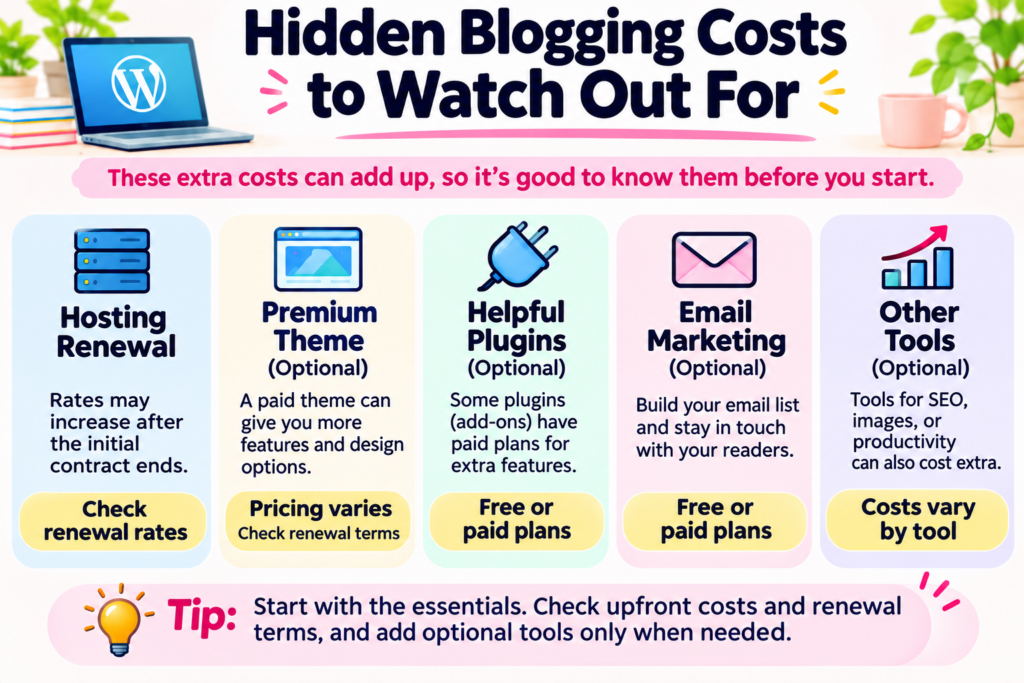
Starting a blog can be affordable, but some expenses are easy to overlook.
These costs are not always included in the advertised hosting price.
Understanding them before you buy can help you avoid unexpected bills later.
1. Hosting Renewal Prices
Many hosting providers offer introductory discounts.
After the first contract ends, the regular price may be higher.
For example, a plan that starts at a low promotional rate may cost significantly more when it renews.
For example, Bluehost’s Starter plan renews at a monthly equivalent of $9.99 when renewed for a 36-month term. This means a hosting renewal payment of $359.64 for 36 months, before applicable taxes and optional add-ons. Prices and renewal terms may change, so always check Bluehost’s current renewal pricing before purchasing.
Before purchasing, check:
- When your introductory period ends
- The renewal price
- Whether the renewal is automatic
- How to manage or cancel automatic renewal
Important: Don’t assume your first-year price will continue forever.
2. Domain Renewal Fees
Some hosting providers include a free domain for the first year.
But you will usually need to pay a renewal fee to keep the domain after that.
Renewal costs can depend on the domain extension and registrar.
A domain is an ongoing expense if you want to keep using the same website address.
3. Domain Privacy
Domain privacy can help limit the personal contact information shown through public domain registration services.
Some domain registrars include privacy protection at no extra cost, while others may charge for it.
Availability can also depend on the domain extension.
Check whether privacy protection is already included before purchasing an additional service.
4. Website Backups and Security
Backups are important because they help you recover your website if something goes wrong.
Security is also important, especially as your blog grows.
Some hosting plans include basic backup or security features, while advanced services may cost extra.
You may also find free WordPress plugins that help with backups and security.
However, free tools may have limitations.
My Experience: While using Bluehost, I experienced a malware problem. Bluehost support helped me deal with it, but the cleanup involved a paid service.
That experience reminded me that website maintenance can sometimes involve unexpected expenses.
It is worth learning how to back up your website and keep WordPress, themes, and plugins updated.
5. Premium Themes and Plugins
A free WordPress theme may be enough when you start.
But you might eventually want premium design features or advanced plugin functions.
Some premium tools charge yearly subscription fees.
Before buying, check whether the price is a one-time payment or an ongoing subscription.
6. Business Email
You may want a professional email address that uses your domain name.
For example:
hello@yourblogname.com
Some hosting packages include email features, while others require a separate paid service.
A professional email address can be useful, but it is not always essential when you are just starting.
7. Optional Marketing Tools
As your blog grows, you may consider paying for:
- Email marketing platforms
- Advanced SEO tools
- Social media scheduling
- Premium design software
- Advertising
- Website maintenance services
These can be helpful for specific goals, but you do not need all of them to publish your first blog post.
Start with free options and add paid services when they provide clear value.
Is Paying for Blog Hosting Worth It?
If you want to create a personal blog just for fun, a free blogging platform may be enough.
But if your goal is to build a blog that you control, customise, and potentially earn money from, paid hosting can be a worthwhile investment.
Here are the main benefits.
More Control Over Your Website
With self-hosted WordPress, you can choose your own themes, plugins, and website structure.
You also have more flexibility to change hosting providers in the future.
This can be useful if your blog grows or your needs change.
More Flexibility for Monetisation
Many people start blogs to build a side income.
Common blogging income methods include:
- Affiliate marketing
- Display advertising
- Sponsored content
- Digital products
- Online services
A self-hosted WordPress website gives you flexibility to explore these options, subject to the rules of the services you use.
However, starting a blog doesn’t guarantee you will make money.
Building traffic and earning income can take time, consistent effort, and useful content.
A Professional Website Address
Using your own domain name can help your blog look more established.
Instead of using a platform-branded address, you can build your website around your own domain.
This also makes it easier to keep a consistent brand as your blog develops.
Is Bluehost Worth Considering?
Based on my experience, Bluehost is a hosting provider I suggest beginners consider.
It was my first web hosting provider, and I found the initial WordPress setup easy to manage.
I also appreciated being able to contact support when I needed help.
However, every hosting provider has advantages and limitations.
Before choosing Bluehost, consider:
- Your budget
- The total upfront cost
- Renewal pricing
- Included features
- Support options
- Your long-term blogging goals
My recommendation: Choose a hosting provider based on your needs, not only the lowest promotional price.
Ready to Start Your WordPress Blog?
If you are ready to move from planning to creating your own website, the next step is choosing a suitable hosting plan.
Bluehost offers WordPress hosting options you can compare before getting started.
Small note: Hosting is a recurring expense. Check current plan details and renewal terms before signing up.
Frequently Asked Questions About Starting a Blog
1. How much does it cost to start a blog in 2026?
A basic self-hosted WordPress blog may cost around $50–$150 for 12 months under some introductory offers. However, longer prepaid contracts can require a higher upfront payment. Always check the total cost and renewal price before purchasing.
2. Can I start a blog for free?
Yes. Some hosted blogging platforms offer free plans.
However, free plans may limit your website design, domain name, features, or monetisation options.
If you want more control over your website, self-hosted WordPress is another option, but you will normally need to pay for hosting.
3. Is WordPress free to use?
Yes. WordPress.org software is free and open source.
You can download and use WordPress without paying a software license fee.
However, you may still need to pay for web hosting, a domain name, and any optional premium tools.
4. How much does Bluehost cost for beginners?
Bluehost offers different hosting plans with introductory promotional prices.
Your total cost depends on the plan, billing period, and optional services you choose.
A low advertised monthly rate may require a longer prepaid contract.
Before signing up, compare the introductory price, total upfront payment, and renewal price on Bluehost’s official website.
5. Do I need to buy a domain name to start a blog?
Not always.
Some free blogging platforms provide a platform-branded website address.
However, if you want your own domain, such as yourblogname.com, you will normally need to register it.
Some hosting providers offer eligible domain registrations free for the first year.
After that, domain renewal fees usually apply.
6. Can I start a WordPress blog without coding?
Yes!
You do not need to know HTML, CSS, or programming to create a basic WordPress blog.
WordPress includes an editor that lets you add text, images, headings, and other content without writing code.
Many hosting providers also offer tools to help beginners install WordPress.
7. Do I need paid WordPress themes and plugins?
No.
You can create a useful blog using a free WordPress theme and free plugins.
Premium tools may offer extra features, but they are not essential for most beginners.
Start with free options and upgrade only when you need specific features.
8. How much does it cost to maintain a blog each year?
Your yearly costs may include hosting renewal, domain renewal, and optional subscriptions.
The total can vary widely depending on your hosting provider, contract length, and tools.
If you use free themes and plugins, hosting and domain renewal may be your main ongoing expenses.
Budget for renewal prices rather than assuming your introductory discount will continue.
9. Can I make money from a blog?
Yes, you can earn money through blogging.
Some common methods include affiliate marketing, display advertising, sponsored posts, and selling digital products.
However, blogging income is not guaranteed.
It can take time to build traffic, develop useful content, and earn your readers’ trust.
10. Is it worth paying to start a blog?
It depends on your goals.
If you want a simple personal journal, a free blogging platform may be enough.
If you want more control over your website, your own domain, and flexibility to monetise your content, paying for self-hosted WordPress may be worthwhile.
Choose an affordable plan and avoid unnecessary upgrades until your blog needs them.
Conclusion: How Much Should You Budget to Start a Blog?
So, how much does it cost to start a blog in 2026?
The answer depends on the type of blog you want to build.
For a basic self-hosted WordPress blog, you may spend around $50–$150 for 12 months of service under some introductory offers. Your upfront payment may be higher if you choose a longer prepaid hosting contract. Remember to budget for future hosting and domain renewals.
The most important thing is to understand what you are paying for.
Here are the key points to remember:
- WordPress.org software is free.
- Web hosting is usually the main startup expense.
- Some hosting plans include a free domain for the first year.
- Free themes and plugins can help you save money.
- Hosting and domain renewal prices may be higher than introductory offers.
- You do not need expensive tools to publish your first blog post.
- Blogging income is possible, but it is never guaranteed.
When I started blogging, Bluehost was my first hosting provider.
I used it for around three years and appreciated how easy it was to get started with WordPress.
That experience is one reason I suggest Bluehost as an option for beginners to consider.
But remember: the best hosting plan fits your budget, your needs, and your long-term goals.
You do not need a perfect website or expensive tools to begin.
Start with the essentials, create useful content, and improve your blog as you learn.
Start Your Blog With Confidence
Ready to turn your blogging idea into a real WordPress website?
Explore Bluehost’s WordPress hosting plans, compare the features, and choose an option that fits your budget.
Small note: Check the latest introductory prices, total upfront cost, renewal terms, and optional add-ons before purchasing.
Recommended Next Reads
Want to learn more before starting your blog? These beginner-friendly guides can help you take the next step.
1. How to Start a Blog with Bluehost (2026) – Step-by-Step Beginner Guide
Learn how to choose a hosting plan, register your domain, install WordPress, and publish your first blog post.
Read the Step-by-Step Bluehost Blogging Guide
2. Bluehost Review (2026)
Explore Bluehost’s features, beginner-friendly tools, pricing considerations, and my experience using the hosting service.
3. Bluehost vs Hostinger (2026)
Compare two popular hosting providers to understand their differences and decide which best fits your blog.
4. Do You Really Need Coding Skills to Start a Blog?
Find out why you can create a WordPress blog without being a programmer.
Read the No-Coding Blogging Guide
5. Best Blogging Platforms for Beginners (2026)
Not sure whether WordPress is the right platform for you?
Compare beginner-friendly blogging platforms before you decide.