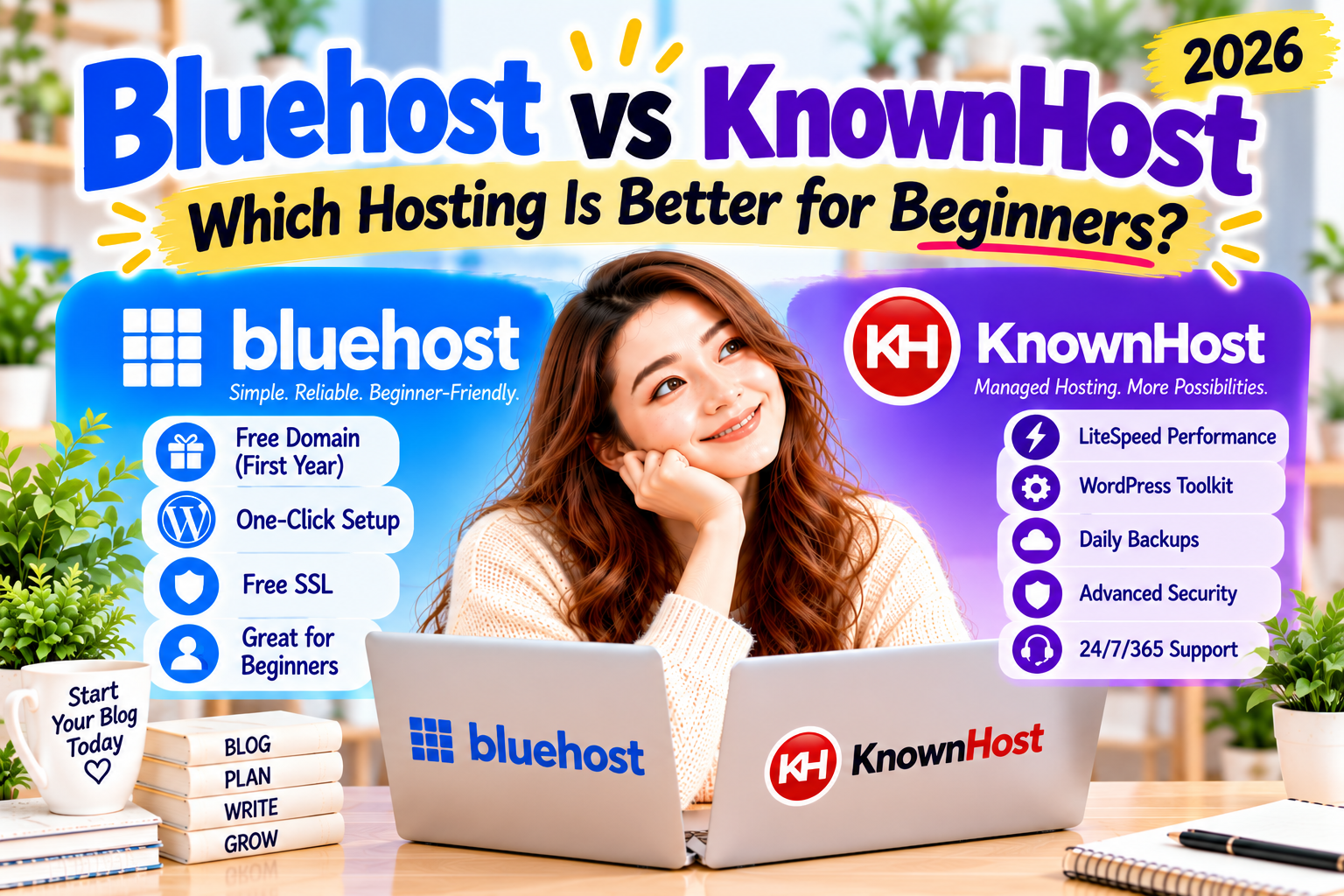
Bluehost and KnownHost are both respected WordPress hosting providers, but they focus on different audiences. Bluehost is designed to make WordPress simple for beginners. KnownHost offers managed WordPress hosting with LiteSpeed, NVMe storage, WP Toolkit, staging, cloning tools, daily backups, and advanced security features for users who want a more performance-focused environment.
In this comparison, we’ll compare pricing, ease of use, WordPress setup, performance, security, customer support, and overall value to help you decide which hosting provider best fits your blogging goals.
👉 My recommendation:
If you’re launching your very first WordPress blog, I recommend Bluehost because it offers beginner-friendly tools, an easy learning experience, and a simple path to getting your website online.
Bluehost is one of the world’s best-known WordPress hosting providers and has been officially recommended by WordPress.org for many years.
It’s designed to help beginners launch a website without needing technical experience.
Bluehost includes:
Beginner-friendly dashboard
One-click WordPress installation
Free domain for the first year (eligible plans)
Free SSL certificate
24/7 customer support
Affordable introductory pricing
Whether you’re starting a personal blog, portfolio, or business website, Bluehost keeps the setup process simple.
What Is KnownHost?
KnownHost is a managed hosting provider that focuses on WordPress performance, security, and reliability.
Its managed WordPress platform includes:
LiteSpeed Web Server
NVMe storage
WP Toolkit
One-click staging
Site cloning
Daily backups
Free SSL certificate
Smart WordPress updates
Security hardening
Malware protection with Imunify360
24/7/365 expert support
These features make KnownHost an attractive choice for users who want a managed WordPress platform with powerful optimisation and built-in management tools.
My First Impression
Both Bluehost and KnownHost are excellent hosting providers, but they target different types of users.
If you’re completely new to blogging, Bluehost offers a smoother experience. Its guided onboarding, simple dashboard, and beginner-focused tools help you get your website online without feeling overwhelmed.
KnownHost stands out with LiteSpeed optimisation, NVMe storage, staging, cloning tools, daily backups, WP Toolkit, and advanced security features. Those extras are valuable for users who prioritise performance or expect to manage more advanced WordPress websites.
For most first-time bloggers, however, I would still recommend Bluehost because it removes much of the technical complexity and lets you focus on learning WordPress and publishing helpful content.
Pricing & Value
Pricing matters when you’re starting your first blog, but the cheapest hosting plan isn’t always the best value.
Bluehost and KnownHost take different approaches. Bluehost focuses on giving beginners an accessible starting point with the essential tools already included, while KnownHost positions its Managed WordPress plans around more dedicated resources, performance tools, and hands-on management.
Bluehost
Bluehost’s WordPress plans are designed to make starting a website straightforward.
Depending on the plan and billing term, features can include:
Free domain for the first year
Free SSL certificate
NVMe storage
Free CDN
Free site migration tool
Managed WordPress updates
WordPress staging
24/7 chat support
30-day money-back guarantee
Bluehost’s Starter plan is designed for a first website or blog, making the package easy for beginners to understand.
💰 Wondering how much it really costs to start a blog?
See the essential expenses before deciding how much you want to spend on hosting.
KnownHost’s Managed WordPress plans start at $5.98 per month on its current three-year promotional term, with the Entry plan renewing at $11.95 per month.
The Entry plan currently includes:
1 WordPress website
50 GB NVMe storage
4 GB memory
Up to 100,000 visits per month
Unlimited email accounts
LiteSpeed and LSCache
Free professional site migration
Scheduled backups
JetBackup access
Staging and cloning tools
This makes KnownHost an attractive package for users who want hosting resources and managed WordPress features from the start.
Which Offers Better Value?
For a first-time blogger, Bluehost has a strong advantage in simplicity and bundled beginner-oriented onboarding.
KnownHost becomes particularly interesting when you value larger storage allocations, LiteSpeed/LSCache, included email accounts, professional migration, and staging/cloning tools.
So instead of looking only at the introductory price, consider what you’ll actually use during your first year of blogging.
Ease of Use
Hosting can look intimidating when you’ve never built a website before.
This is where the hosting experience matters as much as the specifications themselves.
Bluehost
Bluehost focuses heavily on simplifying the process for new website owners.
Its current WordPress offering includes AI site-creation tools, managed WordPress updates, migration tools, and staging, all within its hosting dashboard.
From my own experience, this simplicity mattered when I was learning WordPress.
I didn’t want to understand every technical hosting feature before I could start writing. Getting into WordPress quickly gave me more time to learn how blogging actually worked.
That’s one of the main reasons I keep recommending Bluehost to first-time bloggers.
💻 Worried that starting a blog is too technical?
You don’t need to become a programmer before creating your first website.
Its WordPress plans include free professional migration plus staging and cloning tools, scheduled backups, JetBackup access, and LiteSpeed/LSCache.
This can be especially useful if you’re:
Moving an existing WordPress website
Testing changes before publishing them
Managing backups
Optimizing WordPress performance
Running a website that already receives meaningful traffic
For someone starting completely from scratch, however, some of these capabilities may not be necessary immediately.
Performance
This is where the Bluehost vs KnownHost comparison gets particularly interesting.
Both companies now use modern hosting technologies, but KnownHost’s Managed WordPress plans put performance resources much more prominently at the entre of the package.
Bluehost
Bluehost’s current WordPress plans include NVMe storage on applicable plans, CDN, static content caching, object caching, global data centres, and a 99.99% uptime SLA.
This provides plenty of performance capability for a new blog while still keeping the overall hosting experience approachable.
KnownHost
KnownHost’s Managed WordPress platform uses an NVMe backend with LiteSpeed and LSCache.
Its current Entry plan includes:
50 GB NVMe storage
4 GB memory
2 CPU cores
Up to 100,000 monthly visits
LiteSpeed/LSCache
Unlimited premium bandwidth
Higher plans increase resources additionally, with the Corporate plan supporting up to five WordPress websites and 500,000 monthly visits under KnownHost’s published plan limits.
This makes KnownHost especially appealing to users who care about server resources and performance optimisation.
📊 Bluehost or KnownHost — which matches your blogging journey?
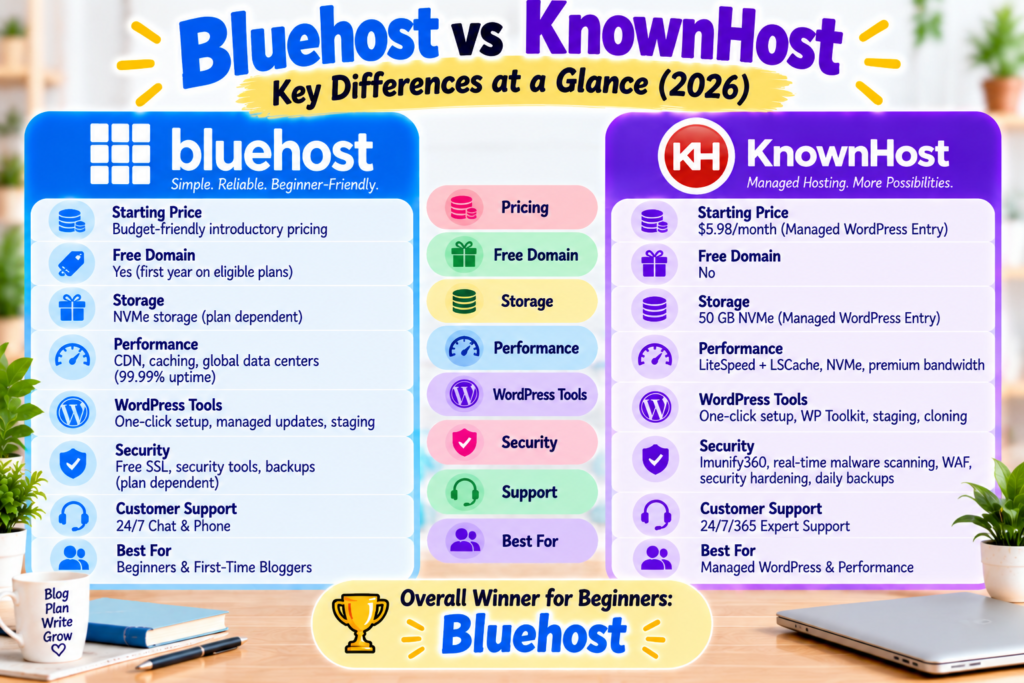
Figure 2. Bluehost focuses on an approachable WordPress experience for new bloggers, while KnownHost combines managed WordPress hosting with LiteSpeed/LSCache, larger resource allocations, staging, backups, and performance-focused tools.
Performance Takeaway
For a brand-new blog, you don’t necessarily need the most advanced hosting environment available.
Bluehost combines modern performance features with an easier starting experience.
KnownHost offers an impressive technical package, particularly for users who value LiteSpeed/LSCache, generous NVMe storage, dedicated plan resources, and managed WordPress tools.
That creates a very clear difference:
Bluehost → Start simple and grow.
KnownHost → Start with more hosting resources and management tools already available.
Security
Security becomes increasingly important as your blog grows.
Bluehost and KnownHost both offer tools to protect WordPress websites, but KnownHost places particular emphasis on managed security as part of its WordPress hosting environment.
Bluehost
Bluehost provides security features designed to help beginners protect their websites without requiring extensive technical knowledge.
Depending on your plan, Bluehost provides features such as SSL, managed WordPress updates, backups, malware-related security tools, and additional security options.
For a new blogger, the biggest advantage is simplicity. You can start building your website without needing to understand every server-level security setting from day one.
When I started blogging, that mattered. I wanted to spend my time learning WordPress and creating content instead of worrying about every technical detail behind my hosting account.
🔒 Want to build your first blog step by step?
Follow my beginner-friendly guide from hosting setup to publishing your website.
Its Managed WordPress environment currently includes:
Imunify360 protection
Real-time malware scanning
Web Application Firewall (WAF)
Brute-force and injection protection
Security hardening
WordPress security monitoring and patching
Free SSL
Daily backups
CloudLinux resource isolation
KnownHost says its Managed WordPress security is designed to protect against threats including SQL injection and cross-site scripting.
Security Takeaway
If built-in managed security is one of your highest priorities, KnownHost has a compelling feature set.
For first-time bloggers, Bluehost keeps the experience approachable, while KnownHost gives users a more extensive managed-security environment from the start.
Customer Support
Customer support matters, especially when you’re building your first website.
A hosting problem that might take an experienced user five minutes to solve can feel much more intimidating when you’re still learning WordPress.
Bluehost
One thing I valued when I started blogging was being able to ask for help.
I contacted Bluehost support several times while I was learning WordPress. Getting help when I ran into problems made me more confident about continuing to build my website.
That experience is one reason Bluehost remains an easy hosting provider for me to recommend to other beginners.
KnownHost provides 24/7/365 support through live chat and tickets.
Its Managed WordPress support goes beyond basic server availability. KnownHost says it manages the server environment, OS updates and security patching, server-level backups, SSL installation, WordPress core updates, security monitoring, and WordPress performance optimisation. Plugin and theme troubleshooting is available on a best-effort basis.
KnownHost also advertises free professional WordPress migration handled by its migration team.
Support Takeaway
Both services approach support differently.
Bluehost works well for beginners who value an approachable hosting experience and access to help while learning.
KnownHost is particularly attractive if you want more of the technical WordPress and server management handled for you.
Bluehost Pros & Cons
Pros
Beginner-friendly WordPress experience
Easy website setup
Free domain for the first year on eligible plans
Free SSL
WordPress-focused tools
Accessible customer support
Good starting point for a first blog
Room to grow as your website develops
Cons
Renewal pricing can be higher than introductory pricing
Some additional features depend on the plan you choose
Advanced users may want more server-level control
KnownHost Pros & Cons
Pros
Fully managed WordPress hosting
LiteSpeed + LSCache
NVMe storage
WP Toolkit
Staging and cloning
Daily backups
Imunify360
Real-time malware scanning and WAF
Free professional site migration
Unlimited email accounts on current Managed WordPress plans
24/7/365 support
KnownHost’s current Managed WordPress platform combines these management, performance, backup, and security tools in the hosting package.
Cons
More hosting tools than a first-time blogger may need
Some beginners may prefer a more streamlined onboarding experience
Managed WordPress plans are specifically designed for WordPress rather than general-purpose application hosting.
Who Should Choose Bluehost?
Bluehost is a strong fit if you:
Are starting your first WordPress blog
Want a simple setup experience
Don’t have much technical experience
Prefer beginner-oriented tools
Want to start publishing quickly
Want hosting that can grow with your blog
Value an easy learning experience
For Masami Blogging readers in particular—people who may be starting a blog or side hustle for the first time—these qualities are important.
Who Should Choose KnownHost?
KnownHost is worth considering if you:
Want fully managed WordPress hosting
Value LiteSpeed and LSCache
Want generous NVMe storage and defined hosting resources
Need staging and cloning tools
Want daily backups included
Want built-in Imunify360 protection
Need free professional migration
Prefer technical WordPress management to be handled for you
Already have a WordPress website you’re planning to move
KnownHost’s platform is also designed to scale from its Entry Managed WordPress plan through higher tiers, with pathways to VPS, cloud, and dedicated hosting as requirements grow.
My Personal Experience and Recommendation
When I started blogging, I wasn’t looking for the most technically advanced hosting platform.
I needed something that would help me actually start.
Bluehost let me get WordPress running quickly, and when I had questions, I could contact support and keep learning. Over time, that helped me become much more comfortable managing my own WordPress website.
That’s why, for someone creating their very first blog, I still recommend Bluehost.
But KnownHost deserves serious consideration.
Its current Managed WordPress plans offer an impressive combination of LiteSpeed/LSCache, NVMe storage, staging, cloning, daily backups, Imunify360 security, and professional migration.
So the choice comes down to what you need:
Choose Bluehost if you want the easiest path into blogging.
Consider KnownHost if you want a more managed, performance-focused WordPress environment from the beginning.
🚀 Ready to start your first WordPress blog?
If you want a beginner-friendly way to launch your website, Bluehost can help you get started without making the process unnecessarily complicated.
Bluehost is designed around a beginner-friendly WordPress experience and is a natural fit for someone creating a first website.
KnownHost is also suitable for WordPress users, but its biggest advantages become more noticeable if you value managed hosting, performance resources, staging, backups, and built-in security tools.
Is KnownHost good for WordPress?
KnownHost offers a dedicated Managed WordPress platform using LiteSpeed/LSCache and NVMe storage. It also includes WP Toolkit, staging and cloning, daily backups, security hardening, free SSL, and professional migration.
Does KnownHost include daily backups?
Yes. KnownHost states that its Managed WordPress plans include daily backups. Its standard backup setup currently retains two daily copies and one weekly copy, with extended backup options available separately.
Does KnownHost provide website migration?
Yes. KnownHost offers complimentary WordPress migrations handled by its migration team. The company says it can transfer the website, files, databases, and email and test the site after migration.
Is KnownHost secure?
KnownHost’s Managed WordPress platform includes Imunify 360, real-time malware scanning, a Web Application Firewall, WordPress security monitoring, and security hardening.
Is KnownHost only for advanced users?
No.
KnownHost itself positions Managed WordPress as suitable for blogs and people launching websites, and it handles many technical WordPress tasks for customers.
Conclusion
Bluehost and KnownHost are both capable WordPress hosting providers, but they take different approaches.
Bluehost focuses on making the beginning of the blogging journey easier.
It’s a strong choice if you’re launching your first WordPress blog and want to get online without spending too much time thinking about technical hosting features.
KnownHost offers a more managed and performance-focused WordPress environment.
LiteSpeed/LSCache, NVMe storage, staging, cloning, daily backups, Imunify 360, and professional migration make it particularly appealing to users who want more hosting functionality built in from the start.
For my target reader—a beginner creating a first blog—I would start with Bluehost.
But if you already have a WordPress site, want to migrate from another host, or value managed performance and security tools, KnownHost deserves a close look.
The important thing isn’t choosing the hosting provider with the longest feature list.
It’s choosing the one that fits where you are in your blogging journey right now.
Struggling to choose between Bluehost and Hostinger? You’re not alone—most beginners feel confused when starting a blog. The good news? You don’t need to be technical to get started. In this guide, you’ll learn which hosting is best for beginners and how to start your blog the easy way. 👉 Start your blog in 10…
Choosing the right web hosting provider is one of the most important decisions you’ll make when starting a blog. With so many hosting companies available, finding the best one for your needs can feel overwhelming—especially if you’re building your first WordPress website. Two hosting providers that are often recommended are Bluehost and HostArmada. Both offer reliable hosting, excellent…
Choosing the right hosting provider is one of the most important decisions you’ll make when starting a WordPress blog. Bluehost and ChemiCloud are both excellent hosting providers, but they serve different priorities. Bluehost focuses on making WordPress simple for beginners, while ChemiCloud offers feature-rich managed WordPress hosting with LiteSpeed servers, NVMe storage, free migrations, daily…
Bluehost and MilesWeb both offer WordPress hosting, but they focus on slightly different audiences. Bluehost is built around simplicity and helping beginners launch their first website with confidence. MilesWeb offers managed WordPress hosting with cloud-based performance, developer tools, AI features, and advanced management capabilities for growing websites. In this comparison, we’ll look at pricing, ease…
Choosing the right web hosting provider is one of the most important decisions you’ll make when starting a blog. If you’ve been comparing Bluehost and IONOS, you’re probably wondering which one offers the best value, the easiest setup, and the most beginner-friendly experience. The truth is that both hosting companies are reliable and well-established. However, they are designed…
Choosing your first web hosting provider can be confusing, especially when both options promise fast performance and an easy website-building experience. Bluehost and Elementor Hosting are both excellent choices, but they serve different users. Bluehost helps beginners launch a WordPress website quickly and affordably, while Elementor Hosting is built for people who plan to build…