Hostinger vs Namecheap (2026): Which Is Better for Beginners?
If you are comparing Hostinger vs Namecheap, you probably want affordable hosting that is easy to use, reliable, and beginner-friendly.
Both companies offer budget-friendly hosting options, but they approach website management differently.
Hostinger focuses on beginner-friendly hosting with a custom dashboard, guided WordPress setup, and website-building tools.
Namecheap offers traditional shared hosting alongside EasyWP, its managed WordPress hosting service.
But which one is better for someone starting their first blog?
In this Hostinger vs Namecheap 2026 comparison, we will explore pricing, WordPress installation, ease of use, performance features, security, backups, and customer support.
We will also compare Namecheap’s shared hosting and EasyWP services.
By the end of this guide, you should have a clearer idea of which hosting provider best fits your budget and blogging goals.
Quick Answer: Hostinger is a strong option for beginners who want guided WordPress setup and a simple hosting dashboard. Namecheap is worth considering if you want affordable hosting and can choose between traditional shared hosting and a dedicated WordPress environment through EasyWP.
The best option depends on your plan, the features you need, and your total website maintenance costs.
Hostinger vs Namecheap: Quick Comparison
Before we get into the details, here is a quick overview of how Hostinger and Namecheap compare.
| Feature | Hostinger | Namecheap |
|---|---|---|
| Best For | Beginners wanting guided hosting setup | Budget-conscious users wanting hosting choices |
| Hosting Options | WordPress hosting, web hosting, cloud hosting | Shared hosting, EasyWP managed WordPress hosting |
| Pricing | Promotional pricing with different billing terms | Affordable shared hosting and EasyWP plans |
| Ease of Use | Custom hPanel dashboard | cPanel for shared hosting; EasyWP dashboard for managed WordPress |
| WordPress Installation | Guided WordPress setup | EasyWP setup or Softaculous on shared hosting |
| Free Domain | Available with eligible hosting plans | Depends on hosting plan and domain offer |
| Free SSL | Available | Available with eligible hosting services |
| Website Backups | Frequency varies by plan | Backup tools and policies vary by hosting product |
| Performance Features | Caching and WordPress optimisation tools | EasyWP caching or shared hosting features |
| Website Management | hPanel and WordPress tools | cPanel or EasyWP dashboard |
| Customer Support | Online support and help resources | Online support and knowledge base |
| Ideal User | First-time bloggers who want guided setup | Bloggers comparing cost and hosting flexibility |
Both companies offer WordPress-compatible hosting, but their services differ.
Hostinger offers a relatively unified experience through its hPanel dashboard.
Namecheap offers different ways to host WordPress, depending on whether you prefer shared hosting or EasyWP.
This difference is important because features available with one Namecheap service may not be included with another.
For example, EasyWP uses a dedicated WordPress management dashboard, while Namecheap’s shared hosting uses cPanel.
What Matters Most for Beginners?
When choosing your first hosting provider, focus on these five factors:
1. Affordable Long-Term Pricing
A low introductory price is attractive, but renewal costs matter too.
2. Easy WordPress Installation
You should be able to install WordPress without coding.
3. Beginner-Friendly Website Management
Managing domains, SSL certificates, and backups should not be unnecessarily complicated.
4. Reliable Website Performance
Your hosting plan should provide enough resources for your website’s needs.
5. Helpful Customer Support
Good documentation and accessible support matter when you run into technical problems.
The best hosting plan isn’t necessarily the cheapest.
It is the one that offers the right combination of affordability, usability, and essential features.
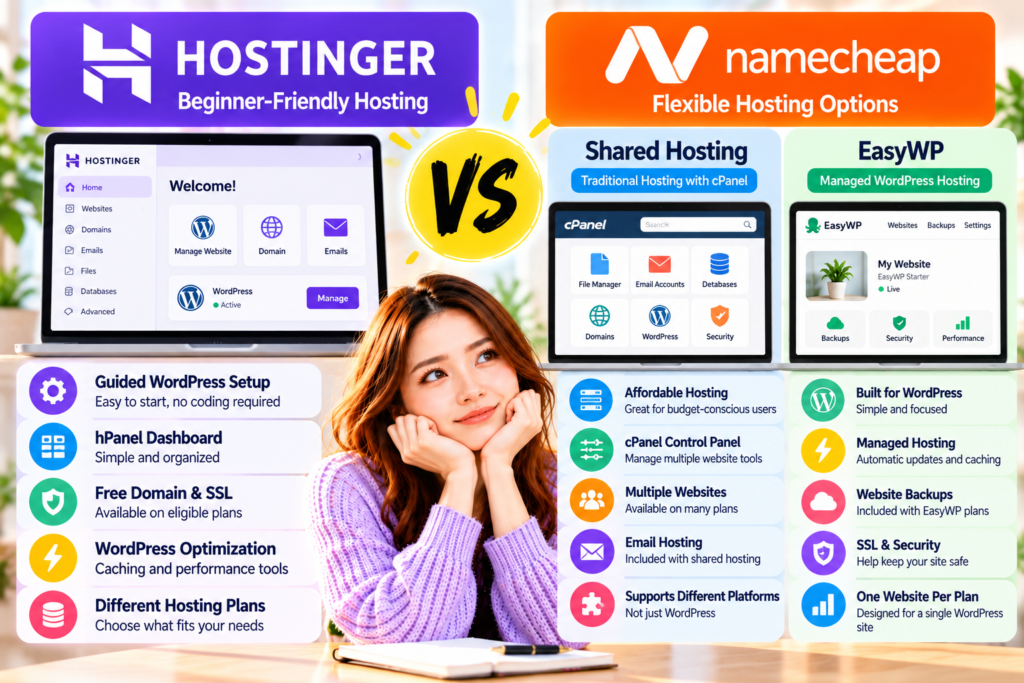
Figure 1. Hostinger focuses on guided WordPress setup and beginner-friendly website management, while Namecheap offers traditional shared hosting and EasyWP managed WordPress hosting. The best option depends on your budget, preferred dashboard, and website requirements.
What Is Hostinger?
Hostinger is a web hosting company that serves individuals, bloggers, businesses, and website owners.
It offers several hosting solutions, including WordPress hosting, web hosting, and cloud hosting.
Hostinger appeals to beginners by combining hosting services with guided setup tools and a custom management dashboard.
Instead of requiring users to understand complicated server settings immediately, Hostinger provides tools designed to simplify common website tasks.
These include WordPress installation, domain management, SSL configuration, and website maintenance.
Hostinger’s Main Features
Depending on the selected hosting plan, Hostinger offers:
- Guided WordPress installation
- A custom hPanel dashboard
- Free SSL certificates
- Free domain registration for the first year on eligible plans
- Website backup options
- WordPress caching and optimisation tools
- Website migration assistance
- AI-assisted website tools
- Customer support
- Additional resources on higher-tier plans
Hostinger’s WordPress plans offer different levels of storage, backups, and website capacity, so beginners should check the exact features before choosing a package.
Why Beginners May Like Hostinger
One of Hostinger’s biggest advantages is its beginner-focused website setup experience.
If you have never built a WordPress website before, the process can feel confusing.
You may need to connect a domain, install WordPress, set up SSL, and learn to manage your website.
Hostinger provides tools designed to guide users through these steps.
Its hPanel dashboard also organises common hosting functions in one place.
This can make website management more approachable for beginners who are unfamiliar with traditional hosting control panels.
Another advantage is Hostinger’s range of hosting plans.
You can start with a plan for a small website and upgrade if your needs change.
However, not every plan includes the same features.
What Should You Know Before Choosing Hostinger?
Hostinger’s promotional prices can look attractive, especially when compared with regular hosting rates.
However, some of the lowest advertised monthly prices require longer subscriptions.
Renewal costs may also be significantly higher than the introductory rates.
Before purchasing, compare:
- The total amount charged at checkout
- The length of the hosting subscription
- The renewal price
- The number of websites allowed
- Backup frequency
- Storage limits
- Included domain and email services
These details can significantly affect your long-term blogging expenses.
Hostinger may be a good fit if you want a guided WordPress setup experience and a straightforward hosting dashboard.
What Is Namecheap?
Namecheap is a company known for domain registration and web hosting services.
In addition to selling domain names, Namecheap provides several hosting solutions for individuals, bloggers, and businesses.
For WordPress users, two important options are:
Namecheap Shared Hosting and Namecheap EasyWP.
Although both can host WordPress websites, they serve different needs.
Understanding this difference is essential when comparing Namecheap with Hostinger.
Namecheap Shared Hosting
Namecheap’s shared hosting is a traditional web hosting service.
It allows customers to manage websites through cPanel, a widely used hosting control panel.
Depending on the plan, users can manage:
- WordPress installations
- Website files
- Domains and subdomains
- Email accounts
- Databases
- SSL certificates
- Website backups
- Other hosting settings
Shared hosting can be useful if you want more control over different website services.
It can also support content management systems other than WordPress.
For example, Namecheap’s shared hosting supports WordPress installation through Softaculous.
This lets you install WordPress without manually uploading all the software files.
However, cPanel contains many settings that may feel unfamiliar to someone creating a website for the first time.
Namecheap EasyWP Managed WordPress Hosting
EasyWP is Namecheap’s managed WordPress hosting service.
Unlike traditional shared hosting, EasyWP is designed specifically for WordPress websites.
It provides a simplified dashboard that lets users manage key website functions.
These include:
- WordPress website setup
- Domain connections
- Website backups
- Website statistics
- Security features
- File and database access
- WordPress-related hosting settings
EasyWP uses a WordPress-focused hosting environment.
Each EasyWP subscription includes one WordPress website, and some features depend on the plan you choose.
Unlike Namecheap’s traditional shared hosting, EasyWP does not provide cPanel.
Why Beginners May Like Namecheap
Namecheap offers flexibility by letting customers choose between different hosting environments.
If you want traditional hosting with cPanel and support for multiple website types, shared hosting may suit you.
If you want a simplified hosting environment specifically for WordPress, EasyWP may be more appealing.
This lets beginners choose a service based on their technical preferences.
Namecheap’s domain registration services may also be convenient if you want to manage your domain and hosting through the same company.
However, you don’t need to buy your domain and hosting from the same provider.
You can register your domain with one company and host your website with another.
What Should You Know Before Choosing Namecheap?
The most important thing to understand is that Namecheap offers different hosting options.
For example:
- Shared hosting uses cPanel.
- EasyWP uses a custom WordPress dashboard.
- Shared hosting supports different website platforms.
- EasyWP is specifically designed for WordPress.
- EasyWP generally requires a separate subscription for each WordPress website.
- Email hosting arrangements differ between shared hosting and EasyWP.
- Backup tools and hosting resources vary by product and plan.
These differences can affect the total cost and how easy it is to manage your blog.
If you are considering EasyWP, make sure you understand what is included in your subscription.
If you are considering shared hosting, check whether you are comfortable using cPanel.
Namecheap may be a good fit if you want affordable hosting options and the flexibility to choose between traditional hosting and a managed WordPress environment.
Hostinger vs Namecheap: My First Impression
At first glance, Hostinger and Namecheap both appear suitable for beginners looking for affordable WordPress hosting.
However, their approaches are different.
My First Impression of Hostinger
Hostinger places considerable emphasis on simplifying website creation.
Its guided WordPress installation, hPanel dashboard, and website management tools may appeal to first-time bloggers.
This is particularly useful if you want to focus on publishing content rather than learning complicated hosting settings.
Hostinger also offers different hosting plans so that users can choose resources based on their website’s needs.
However, it is important to look beyond introductory discounts.
A hosting plan should remain affordable after the initial promotional period.
My First Impression of Namecheap
Namecheap stands out because it offers both traditional shared hosting and EasyWP managed WordPress hosting.
This gives users a choice between a more flexible hosting environment and a simplified WordPress-focused service.
Beginners who want to run only one WordPress blog may find EasyWP worth considering.
Users who want cPanel, email management, or support for different website platforms may find Namecheap’s shared hosting more suitable.
However, comparing Namecheap plans requires careful attention because the features vary between hosting products.
Which Looks Better for Beginners?
Based on their published features, Hostinger may appeal more to beginners who want a guided website setup experience.
Namecheap may appeal to users who want a choice between traditional shared hosting and a WordPress-specific hosting service.
Neither company is automatically the better option for everyone.
I have not personally tested Hostinger and Namecheap side by side, so this comparison is based on their published features and hosting structures rather than firsthand performance testing.
For a new blogger, the most important consideration is choosing a hosting service that feels manageable and fits the budget.
Both companies are worth considering, but the differences become clearer when you compare pricing, WordPress setup, performance features, and long-term value.
Hostinger vs Namecheap: Pricing & Value
Beginners often start by comparing pricing when choosing web hosting.
If you are starting a blog as a side hustle, you probably want to keep your expenses low while making sure your website has the features it needs.
Both Hostinger and Namecheap offer affordable hosting options, but the lowest advertised price doesn’t always mean the best long-term value.
The most important factors are the introductory cost, renewal price, billing period, and included features.
Hostinger Pricing
Hostinger offers promotional prices for new customers, with discounts often linked to longer subscription periods.
Its hosting plans differ in storage, website limits, backup frequency, and additional WordPress tools.
Depending on the selected plan, you may receive:
- A free domain for the first year
- Free SSL certificates
- WordPress installation tools
- Website backups
- Caching and optimisation features
- Email services for a limited introductory period
- Additional WordPress management features on higher-tier plans
However, some features are not available on every plan.
For example, higher-tier plans may include daily backups, but some entry-level plans require an additional purchase.
Hostinger also publishes renewal prices that are higher than many of its introductory offers.
This means beginners should compare the full subscription cost rather than focusing only on the monthly price shown in advertisements.
For the latest details, see the official Hostinger hosting plans.
Namecheap Shared Hosting Pricing
Namecheap’s shared hosting is designed for customers who want an affordable, traditional hosting environment.
Its plans generally include cPanel and tools to manage WordPress, email accounts, databases, and website files.
Some plans also let you host multiple websites under one subscription.
This can make shared hosting attractive if you want to manage multiple projects.
However, features such as automated backups, storage, and website limits vary by plan.
Namecheap also offers promotional rates that may change at renewal.
Before choosing shared hosting, check whether the plan includes everything your WordPress blog needs.
Compare the available options on the official Namecheap Shared Hosting page.
Namecheap EasyWP Pricing
EasyWP uses a different pricing structure from Namecheap’s shared hosting.
Each EasyWP subscription supports one WordPress website.
This can be convenient if you want a simple hosting environment without managing traditional server settings.
EasyWP plans include WordPress-focused features such as caching, SSL, backups, and management tools, though resources and specific features vary by plan.
If you plan to create only one blog, EasyWP may be a straightforward option.
However, if you want to run several independent websites, you should calculate the cost of separate EasyWP subscriptions.
Also check whether you need separate email hosting.
For current offers and renewal terms, visit Namecheap EasyWP Pricing.
Hostinger vs Namecheap: Pricing Comparison
| Pricing Factor | Hostinger | Namecheap Shared Hosting | Namecheap EasyWP |
|---|---|---|---|
| Introductory Discounts | Available | Available | Available |
| Renewal Pricing | Higher than promotional rates | Depends on plan and billing term | Depends on plan and billing term |
| WordPress Hosting | Included in compatible plans | WordPress can be installed | Specifically designed for WordPress |
| Multiple Websites | Depends on plan | Depends on plan | One per subscription |
| Email Hosting | Depends on plan and offer | Available with shared hosting | May require a separate service |
| Backups | Depends on plan | Depends on plan | WordPress backup features included |
| Best Value For | Beginners wanting guided setup | Users wanting flexible hosting | Users wanting one managed WordPress website |
Which Hosting Offers Better Value?
There is no universal winner based on price alone.
Hostinger may offer better value if you want a guided WordPress setup experience and the convenience of managing your website through hPanel.
Namecheap Shared Hosting may be attractive if you want traditional hosting with cPanel and email management.
EasyWP may offer good value if you only need one WordPress website and prefer a simplified managed hosting environment.
The final decision should depend on the total cost over your intended subscription period.
Winner: Tie — the best value depends on the selected plan and your website requirements.
Hostinger vs Namecheap: Ease of Use
Ease of use matters, especially when you are building your first WordPress website.
As a beginner, you should be able to manage your hosting account without spending hours learning technical terminology.
Hostinger and Namecheap provide different management experiences.
Hostinger: hPanel Dashboard
Hostinger uses a custom hosting dashboard called hPanel.
It helps users manage their websites through a centralised interface.
Common tasks include:
- Managing domains
- Installing WordPress
- Accessing website files
- Configuring SSL
- Managing backups
- Checking website settings
- Accessing WordPress management tools
Hostinger also provides a WordPress Overview area where users can access important settings and maintenance features.
These include WordPress updates, caching, backups, and other management options depending on the hosting plan.
For beginners, this organised approach can make website management feel more approachable.
Namecheap Shared Hosting: cPanel
Namecheap Shared Hosting uses cPanel.
cPanel is a popular hosting control panel that offers many website management features.
It allows users to manage files, databases, email accounts, domains, and applications.
This flexibility is useful, especially if you want to manage different types of websites.
However, cPanel contains many tools and settings.
A complete beginner may need time to understand which features apply to their website.
That does not mean cPanel is unsuitable for beginners.
It simply offers a more traditional hosting experience.
Namecheap EasyWP: Simplified WordPress Dashboard
EasyWP takes a different approach.
Instead of providing a traditional cPanel environment, EasyWP offers a dashboard focused specifically on WordPress.
Users can manage their WordPress installation, backups, domain settings, and other hosting functions through this interface.
Because EasyWP is designed for WordPress, beginners don’t have to navigate as many general-purpose hosting tools.
This makes EasyWP a strong alternative to Hostinger for users who want a simplified WordPress management experience.
Which Is Easier for Beginners?
Hostinger and EasyWP both emphasise simplicity.
Hostinger offers a guided setup experience and a broader hosting management dashboard.
EasyWP focuses specifically on WordPress.
Namecheap Shared Hosting offers more traditional control through cPanel.
For a first-time blogger who wants a guided hosting experience, Hostinger has a slight advantage.
However, EasyWP remains a competitive option for managing a single WordPress website.
Winner: Hostinger — slight advantage for guided beginner onboarding.
Hostinger vs Namecheap: WordPress Setup
Installing WordPress is one of the first steps in creating a blog.
Fortunately, neither Hostinger nor Namecheap requires beginners to install WordPress manually through complicated server commands.
Installing WordPress With Hostinger
Hostinger provides guided WordPress installation during the website setup process.
Users can choose WordPress, enter their website information, and follow the setup instructions.
After installation, they can access the WordPress dashboard and begin creating their website.
Hostinger also provides tools in hPanel to manage WordPress settings.
This can make the initial setup process easier for users who have never worked with web hosting before.
Installing WordPress With Namecheap Shared Hosting
Namecheap Shared Hosting supports WordPress installation through Softaculous.
This tool allows users to install WordPress through cPanel without manually uploading the software.
The general process involves selecting WordPress, choosing the installation location, and entering the required website information.
After installation, users can access the WordPress dashboard.
This is a convenient option for beginners who are comfortable navigating cPanel.
Installing WordPress With EasyWP
EasyWP is specifically designed for WordPress websites.
Its setup process creates a WordPress installation without requiring users to configure a traditional hosting environment.
Users can create and manage a WordPress website through the EasyWP dashboard.
This removes several steps associated with conventional shared hosting.
Which Is Better for WordPress Installation?
All three hosting options provide simplified ways to install WordPress.
Hostinger offers guided onboarding.
EasyWP is designed specifically for WordPress setup.
Namecheap Shared Hosting provides installation through Softaculous.
For beginners, all three are practical options.
Winner: Tie — all three offer beginner-accessible WordPress installation.
Hostinger vs Namecheap: Performance & Speed
Website speed matters because visitors expect pages to load quickly.
A slow website can frustrate visitors, especially on mobile devices.
However, hosting performance depends on several factors.
These include:
- Server resources
- Website design
- WordPress theme
- Installed plugins
- Image optimisation
- Caching
- Visitor location
- Website traffic
A hosting company may provide performance tools, but these features don’t automatically guarantee faster load times.
Hostinger Performance Features
Hostinger offers WordPress performance tools, including LiteSpeed caching.
Depending on your plan, you may also have access to additional optimisation features.
LiteSpeed caching can reduce the work required to generate frequently accessed pages.
Hostinger’s WordPress management interface also provides access to caching controls and related settings.
Some higher-tier plans include additional caching capabilities.
For beginners, these tools can make performance optimisation more accessible.
However, a WordPress website’s actual speed depends on its configuration.
Namecheap Shared Hosting Performance
Namecheap Shared Hosting uses a traditional shared hosting environment.
This means the underlying infrastructure shares resources.
Performance depends on the selected plan, available resources, and website configuration.
WordPress users may also improve performance through suitable caching plugins, image optimisation, and lightweight themes.
Shared hosting can be sufficient for a new blog, but beginners should check resource limits and upgrade options.
Namecheap EasyWP Performance
EasyWP is designed specifically for WordPress hosting.
Its platform includes built-in caching technology intended to improve website performance.
Namecheap describes multiple caching layers, including Varnish, OPcache, and Redis object caching.
These features can reduce repeated processing and improve WordPress website efficiency.
EasyWP also provides a WordPress-focused hosting environment rather than a traditional cPanel setup.
This may appeal to beginners who want performance tools managed within their hosting service.
Hostinger vs Namecheap: Which Is Faster?
Both Hostinger and EasyWP offer WordPress optimisation features.
Namecheap Shared Hosting also supports WordPress optimisation, although the available tools and resources depend on the plan.
Without controlled, independent testing using comparable websites and hosting plans, it’s misleading to claim one provider is consistently faster.
Winner: Tie — both Hostinger and Namecheap EasyWP provide WordPress performance tools, but actual speed depends on the website and plan.
Hostinger vs Namecheap: WordPress Management Features
Managing a WordPress website involves more than installing the software.
Over time, you may need to update WordPress, create backups, change settings, or troubleshoot technical issues.
Good hosting management tools can make these tasks easier.
Hostinger WordPress Management
Hostinger provides WordPress management tools through hPanel.
Depending on the selected plan, users can access:
- WordPress updates
- Caching controls
- Website backups
- Maintenance mode
- PHP version settings
- WordPress installation management
- Staging tools where supported
These features can help beginners manage common WordPress tasks without working directly with server files.
However, some tools and backup options depend on the hosting package.
Namecheap Shared Hosting Management
Namecheap Shared Hosting provides management tools through cPanel.
Users can manage:
- Website files
- Databases
- Email accounts
- Domains
- WordPress installations
- Backups
- PHP settings
- Other hosting functions
This provides considerable flexibility.
However, users may need to manage more technical settings themselves compared with a dedicated managed WordPress service.
Namecheap EasyWP Management
EasyWP provides a WordPress-focused dashboard.
It includes tools for managing WordPress websites without using cPanel.
Namecheap’s current EasyWP plans advertise features such as automated backups, WordPress updates, caching, SSL, and security tools.
The service handles more hosting-side configuration, letting users focus on their WordPress websites.
However, EasyWP is not as flexible as traditional shared hosting for users who need non-WordPress applications or extensive server configuration.
Which Offers Better WordPress Management?
Hostinger provides a useful combination of general hosting controls and WordPress management tools.
Namecheap Shared Hosting offers flexibility through cPanel.
EasyWP provides a more specialised WordPress management environment.
The better choice depends on whether you prefer a broader hosting dashboard, traditional control, or WordPress-specific simplicity.
Winner: Tie — Hostinger and EasyWP offer different but useful approaches to WordPress management.
Hostinger vs Namecheap: Comparison Results
Here is a summary of the five main categories covered so far.
| Comparison Category | Winner | Main Reason |
|---|---|---|
| Pricing & Value | Tie | Depends on plan, renewal cost, and included features |
| Ease of Use | Hostinger | Slight advantage for guided beginner onboarding |
| WordPress Setup | Tie | Both providers offer simplified installation |
| Performance & Speed | Tie | No verified head-to-head benchmark |
| WordPress Management | Tie | Hostinger and EasyWP offer different management strengths |
These results are editorial assessments of published features, not laboratory performance measurements.
Editorial comparison only. Not a performance benchmark.
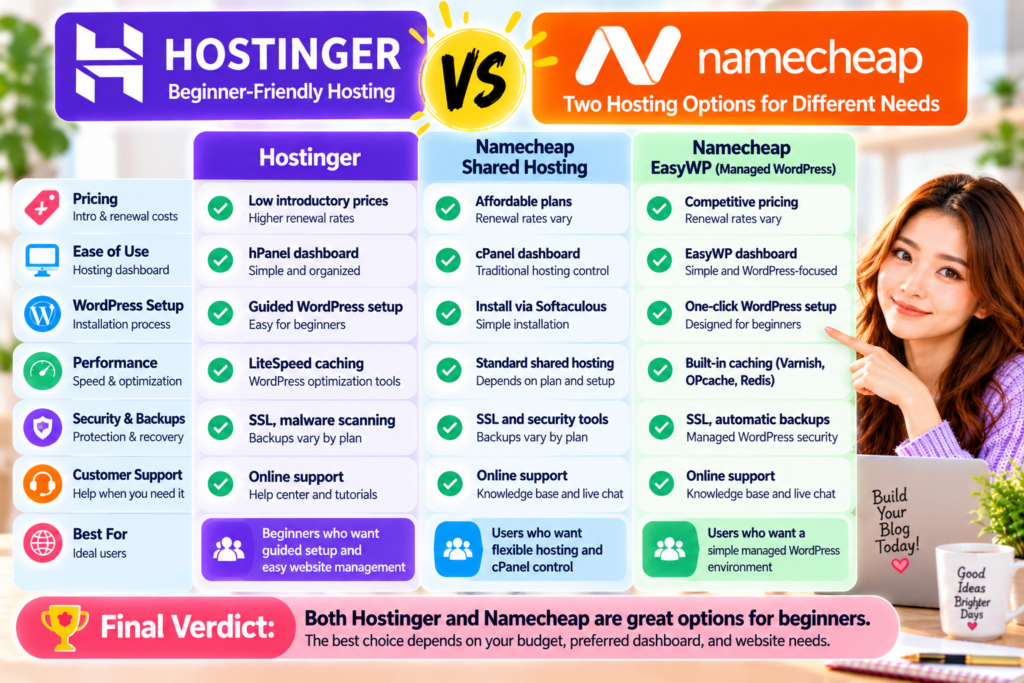
Figure 2. Hostinger has a slight advantage for guided beginner onboarding, while Namecheap offers two distinct hosting approaches through Shared Hosting and EasyWP. Pricing, WordPress installation, performance, and management depend on the hosting product and plan you choose.
Hostinger vs Namecheap: Which Is Better So Far?
Based on the five categories above, Hostinger has a slight advantage for beginners who want a guided website setup experience.
Its hPanel dashboard and WordPress tools make it easy to manage a new blog.
However, don’t overlook Namecheap.
Its shared hosting can be attractive to users who want cPanel and a flexible hosting environment.
EasyWP may be a good alternative for beginners who want dedicated WordPress hosting with built-in management and caching.
The key is to compare the correct products.
For example, comparing Hostinger’s WordPress hosting with Namecheap EasyWP is different from comparing Hostinger with Namecheap’s traditional shared hosting.
These services have different management environments, resource limits, and included features.
For a first-time blogger, I would focus on three questions before making a decision:
Is the hosting plan affordable after renewal?
Does it include the WordPress features I actually need?
Will I feel comfortable managing the website myself?
Answering these questions is more useful than choosing a hosting company based only on an introductory discount.
Security is an important part of running a WordPress blog.
Even a small website can face issues like malware, outdated plugins, accidental file deletion, or unauthorised login attempts.
For beginners, choosing hosting with useful security and backup tools can make website management less stressful.
Both Hostinger and Namecheap offer security features, but the level of protection and backup options depend on the hosting product and plan.
Hostinger Security Features
Hostinger provides several security tools designed to help protect hosted websites.
Depending on your hosting plan, these may include:
- Free SSL certificates
- Malware scanning and security monitoring
- DDoS protection
- Website backups
- WordPress security tools
- Two-factor authentication for account access
- Additional security features on eligible plans
SSL certificates help encrypt information exchanged between visitors and your website.
However, SSL alone does not protect against every type of security threat.
Keeping WordPress, themes, and plugins updated is also important.
Hostinger Backup Options
Hostinger provides website backups, but the backup schedule and available restore options depend on the plan.
Some plans include weekly backups, while others provide daily backups.
For beginners, daily backups can be especially helpful if you frequently publish content or make changes to your website.
Before purchasing, check the exact backup frequency and restoration options included in your selected plan.
Review the latest details on the official Hostinger WordPress Hosting page.
Namecheap Shared Hosting Security
Namecheap Shared Hosting provides security features through its hosting environment and cPanel tools.
Depending on the plan and configuration, these may include:
- SSL certificates
- Account security settings
- Website backup tools
- Spam protection
- Server-side security measures
- File and database management
- Additional security services
Because shared hosting gives users more control over their hosting environment, website owners may also need to manage more security-related tasks themselves.
For example, installing WordPress security plugins and keeping software updated can reduce common risks.
Namecheap EasyWP Security & Backups
EasyWP is designed specifically for WordPress hosting.
It includes a managed hosting environment with WordPress-focused security and backup features.
Depending on the EasyWP plan, users may have access to:
- SSL protection
- Automated backups
- Backup restoration tools
- WordPress security features
- Managed hosting infrastructure
- Additional security options
EasyWP simplifies several hosting management tasks compared with traditional shared hosting.
However, beginners should still check the backup schedule, retention period, and restoration options before choosing a plan.
For current details, visit the official Namecheap EasyWP page.
Which Is Better for Security & Backups?
Both Hostinger and Namecheap provide security and backup features.
Hostinger offers WordPress-related security tools through its hosting dashboard.
Namecheap Shared Hosting provides security controls through a traditional hosting environment, while EasyWP offers a more WordPress-focused approach.
Because the included features vary by plan, neither provider has a clear universal advantage.
Winner: Tie — compare backup frequency, restoration options, and included security features before purchasing.
Hostinger vs Namecheap: Customer Support
Customer support matters most when you are building your first website.
Even if you follow a beginner-friendly WordPress tutorial, you may still run into technical problems.
For example, you might need help with:
- Connecting your domain
- Installing WordPress
- Configuring SSL
- Fixing website errors
- Restoring a backup
- Understanding hosting settings
- Resolving email problems
Both Hostinger and Namecheap offer customer support and online help resources.
Hostinger Customer Support
Hostinger provides online customer assistance through its support system.
It also offers tutorials, guides, and a knowledge base covering common hosting and WordPress questions.
These resources can help beginners solve routine problems without needing advanced technical knowledge.
Hostinger’s support experience may vary depending on the issue and the available support channels.
Namecheap Customer Support
Namecheap provides customer assistance through online support channels, including live chat.
It also maintains a knowledge base covering domains, shared hosting, EasyWP, and other services.
This can be useful if you manage your domain and hosting through the same provider.
However, support procedures may differ depending on whether you use shared hosting or EasyWP.
Which Hosting Has Better Support?
Both companies offer support resources for beginners.
However, support quality can vary depending on the issue, the representative, and when you contact them.
I haven’t personally run a controlled support test comparing Hostinger and Namecheap.
Therefore, I can’t claim either company consistently provides faster or better assistance.
Winner: Tie — both offer customer support and self-help resources.
Hostinger Pros & Cons
Hostinger offers several features that may appeal to first-time bloggers.
However, it also has limitations worth considering.
Hostinger Pros
- Beginner-friendly hPanel dashboard
- Guided WordPress installation
- WordPress management tools
- Caching and optimisation features
- Free SSL certificates
- Free domain offers on eligible plans
- Website migration options
- Multiple hosting plans for different needs
- Online customer support and tutorials
Hostinger Cons
- Introductory prices may require long subscriptions
- Renewal prices can be higher than promotional rates
- Backup frequency varies by plan
- Some advanced WordPress features require higher-tier plans
- The cheapest plan may not include every feature a growing blog needs
Is Hostinger Worth It?
Hostinger is worth considering if you want a beginner-friendly hosting dashboard and guided WordPress setup.
Its tools can help simplify common website management tasks.
However, make sure the renewal price and included features fit your long-term budget.
Namecheap Pros & Cons
Namecheap offers different hosting options, including traditional shared hosting and EasyWP.
This flexibility can be useful, but it also means beginners need to compare the products carefully.
Namecheap Pros
- Affordable hosting options
- Traditional shared hosting with cPanel
- EasyWP managed WordPress hosting
- WordPress installation tools
- Domain registration services
- WordPress-focused management through EasyWP
- Built-in caching features with EasyWP
- SSL and backup options
- Online customer support and knowledge base
Namecheap Cons
- Shared Hosting and EasyWP have different features
- cPanel may feel complicated to some beginners
- EasyWP hosts one WordPress website per subscription
- Email hosting arrangements vary by product
- Renewal costs should be checked carefully
- Backup features and resource limits depend on the selected plan
Is Namecheap Worth It?
Namecheap is worth considering if you want affordable hosting and a choice between traditional shared hosting and a WordPress-specific service.
EasyWP may be especially appealing if you want to manage one WordPress website without using cPanel.
However, compare the exact features before purchasing.
Who Should Choose Hostinger?
Hostinger may be the better choice if you:
- Are starting your first WordPress blog
- Want guided website setup
- Prefer a simple hosting dashboard
- Want WordPress management tools in one place
- Plan to create a blog as a side hustle
- Prefer an approachable hosting experience
- Are comfortable checking renewal costs before buying
Hostinger is particularly attractive to beginners who want to focus on creating content instead of learning traditional hosting controls.
Its hPanel dashboard and WordPress setup tools can help reduce the complexity of getting started.
Best for: Beginners who want guided WordPress setup and straightforward hosting management.
Who Should Choose Namecheap?
Namecheap may be the better choice if you:
- Want to compare affordable hosting options
- Prefer traditional cPanel hosting
- Need hosting for different types of websites
- Want a WordPress-focused service through EasyWP
- Plan to run one WordPress website with EasyWP
- Already use Namecheap for domain registration
- Prefer choosing between shared hosting and managed WordPress hosting
If you want traditional website management, Namecheap Shared Hosting may be a good fit.
If you only need one WordPress blog and prefer a simplified dashboard, EasyWP may be a better match.
Best for: Budget-conscious users who want flexibility between traditional hosting and managed WordPress hosting.
My Personal Recommendation
If I were choosing between Hostinger and Namecheap for a first WordPress blog, I would start by comparing Hostinger’s beginner-focused hosting plans with Namecheap EasyWP.
Both provide tools designed to make WordPress setup more approachable.
However, they take slightly different approaches.
Hostinger offers guided setup and a hosting dashboard that combines WordPress management with other hosting functions.
EasyWP provides a more specialised environment designed for WordPress.
For someone who wants a traditional hosting control panel, Namecheap Shared Hosting is another option.
Which Would I Choose for a Beginner?
Based on the published features, I would lean slightly toward Hostinger for a complete beginner who wants guided WordPress setup.
However, that does not mean Hostinger is always the better value.
If Namecheap offers a plan that meets your requirements at a lower total cost, it may be the more practical choice.
I have not personally tested these two hosting services side by side, so this recommendation is based on their published features rather than firsthand performance measurements.
What About Bluehost?
When I started using WordPress, Bluehost was my first hosting provider.
I found the initial setup straightforward and got started with WordPress without coding.
That experience is one reason I often recommend Bluehost to beginners who feel nervous about starting their first website.
However, my experience with Bluehost is separate from this Hostinger vs Namecheap comparison.
The best hosting provider for you still depends on your budget, preferred tools, and website requirements.
If you want another beginner-friendly option, read my Bluehost Review.
Before You Choose Your Hosting
Before purchasing Hostinger or Namecheap, compare the following:
- Total checkout cost
- Renewal price
- Subscription length
- WordPress installation tools
- Backup frequency
- Included email services
- Website limits
- Customer support options
Choosing the right hosting plan now can help you avoid unnecessary expenses later.
Ready to compare your options?
Review the current Hostinger WordPress hosting plans and Namecheap hosting options before you decide.
Frequently Asked Questions
1. Is Hostinger better than Namecheap for beginners?
Hostinger may be easier for complete beginners who want guided WordPress setup and a centralised hosting dashboard.
However, Namecheap EasyWP also offers a simplified WordPress management experience.
The best choice depends on your preferred tools and budget.
2. Is Namecheap cheaper than Hostinger?
Not necessarily.
Both providers offer promotional prices, and the total cost depends on the hosting plan, subscription length, and renewal rates.
Compare the checkout price and the renewal price before deciding.
3. Is Hostinger good for WordPress?
Yes. Hostinger offers WordPress-compatible hosting with installation tools, caching features, and website management options.
Available features depend on the plan you select.
4. Can I use WordPress with Namecheap?
Yes.
You can install WordPress on Namecheap Shared Hosting or choose EasyWP, its managed WordPress hosting service.
These products have different dashboards and features.
5. What is the difference between Namecheap Shared Hosting and EasyWP?
Namecheap Shared Hosting uses cPanel and supports various website types.
EasyWP is designed specifically for WordPress and provides a simplified management dashboard.
EasyWP generally hosts one WordPress website per subscription.
6. Which is faster, Hostinger or Namecheap?
There is no reliable universal winner without comparable performance testing.
Hostinger provides WordPress optimisation tools, while Namecheap EasyWP includes caching technology.
Actual website speed depends on the plan, website configuration, and visitor location.
7. Does Hostinger include free SSL?
Hostinger offers free SSL certificates with its hosting services.
However, you should check the exact features included in your selected plan.
8. Does Namecheap include website backups?
Namecheap provides backup options for Shared Hosting and EasyWP, but the backup schedule, retention period, and restoration tools vary by product and plan.
Check the current plan details before purchasing.
9. Is EasyWP better than traditional shared hosting?
EasyWP may be easier if you only want to manage a WordPress website.
Traditional shared hosting may be more suitable if you want cPanel, email management, or support for other website platforms.
Neither option is automatically better for every user.
10. Can I move my WordPress website from Namecheap to Hostinger?
Yes, you can generally migrate WordPress websites between compatible hosting providers.
Hostinger offers website migration services, although eligibility and supported migration methods may depend on the website and hosting plan.
Always create a backup before starting a migration.
Conclusion: Hostinger vs Namecheap — Which Should You Choose?
Choosing between Hostinger and Namecheap depends on your budget, preferred website management tools, and long-term blogging goals.
Both providers offer affordable ways to host a WordPress website.
However, their approaches are different.
Hostinger focuses on guided WordPress setup, a beginner-friendly dashboard, and integrated hosting management tools.
Namecheap offers both traditional shared hosting and EasyWP managed WordPress hosting.
Final Verdict
Choose Hostinger if:
You are a beginner who wants guided WordPress setup and a straightforward hosting dashboard.
Choose Namecheap Shared Hosting if:
You prefer cPanel, want traditional hosting flexibility, or need to manage different types of websites.
Choose Namecheap EasyWP if:
You want a simplified hosting environment specifically designed for one WordPress website.
My Final Recommendation
For a complete beginner starting a first WordPress blog, Hostinger has a slight advantage in guided setup and onboarding.
However, Namecheap remains a strong alternative, particularly through EasyWP.
Pricing, performance, backups, and support don’t have a clear universal winner because results depend on your plan and website needs.
Do not choose hosting based only on the lowest advertised price.
Instead, compare the features you need, the renewal costs, and how comfortable you feel managing the website.
The right hosting provider should make it easier for you to focus on creating useful content and growing your blog.
Recommended Next Reads
If you are still comparing hosting providers or planning your first WordPress website, these guides may help:
Bluehost vs Hostinger — Compare two popular beginner-focused hosting providers and discover which may suit your first blog.
Bluehost vs Namecheap — Explore the differences between Bluehost and Namecheap, including pricing, features, and beginner usability.
Bluehost Review — Read about my experience starting a WordPress website with Bluehost and what beginners should consider.
How Much Does It Cost to Start a Blog? — Learn about hosting expenses, domain registration, WordPress tools, and other costs involved in launching a blog.